Your first API call
By the end of this page you'll have made a real request to your own data and handled the errors properly. It assumes nothing — if you've never used an API before, start at the top and follow along; if you have, skip to Step 3 and then read the API reference instead of the rest of this.
Everything here uses curl, which is already installed on macOS and Linux and ships
with Windows 10 and later. There's a JavaScript version of each step underneath.
- An organization on a plan that includes API access — Business or any plan above it.
- Permission to manage the organization — only owners and admins can create keys.
- A terminal.
Step 1 — Create an API key
-
Open the console and switch to the organization you want to use.
-
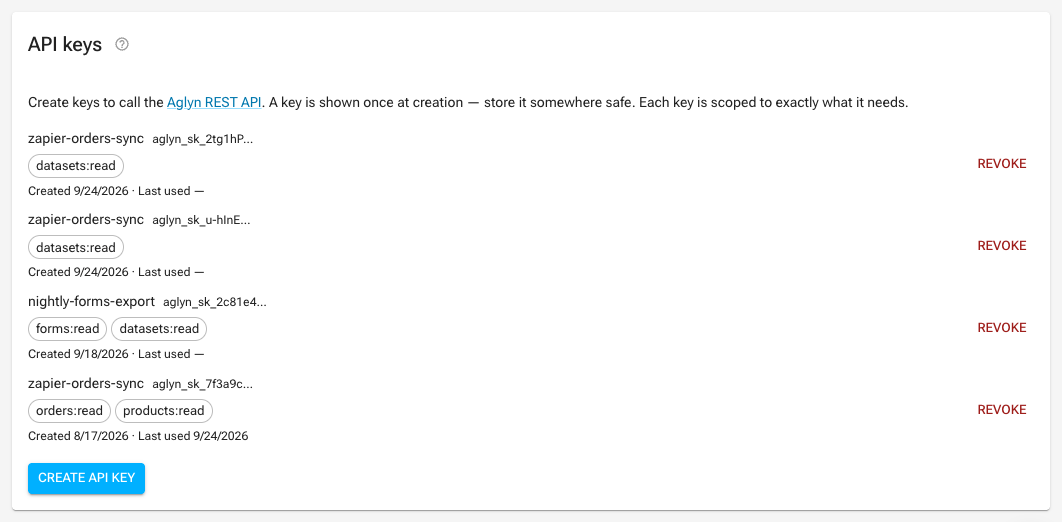
Go to Organization → Settings → API keys.
-
Choose Create API key.
-
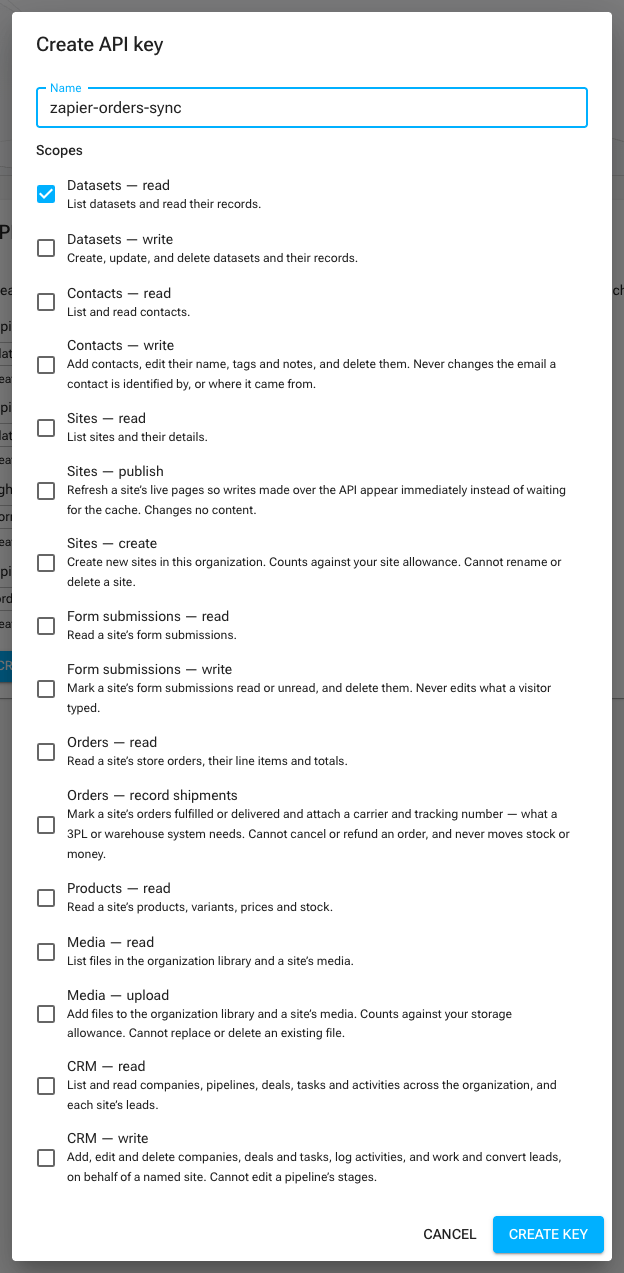
Give it a name that says what it's for —
zapier-orders-sync, notkey 1. The name is what you'll be looking at in six months deciding whether it's safe to revoke. -
Select its scopes. A scope is one permission. Grant the fewest that do the job: for this walkthrough, tick Datasets — read.
-
Choose Create.
Copy the key now. It's shown exactly once. Aglyn stores only a hash of it and genuinely cannot show it to you again — if you lose it, the fix is to revoke it and make a new one, which costs you nothing but a minute.
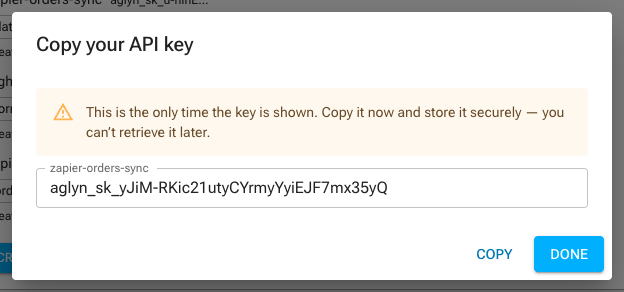
A key looks like this:
aglyn_sk_live_9dK2x...
The key carries your organization's access, not your personal login. Anyone holding it can do everything its scopes allow.
- Never commit it to git. Put it in an environment variable or a secrets manager.
- Never put it in a web page, a mobile app, or anything a browser downloads — a key in client-side JavaScript is a public key.
- Use one key per integration, so you can revoke one without breaking the others.
Store it in your shell for the rest of this page:
export AGLYN_API_KEY="aglyn_sk_live_9dK2x..."
Step 2 — Check that the key works
Before writing anything real, confirm the key is valid and see what it can do:
curl https://app.aglyn.com/api/v1/me \
  -H "Authorization: Bearer $AGLYN_API_KEY"
{
  "object": "api_key",
  "org": "org_abc123",
  "scopes": ["datasets:read"]
}
That's the whole handshake. Authorization: Bearer <key> is how every request
authenticates — there is no login step, no token exchange, no session.
If you get something else, jump to errors.
GET /v1/me is the cheapest way to fail fast with a clear message. An integration
that checks its key on boot tells you "the key is wrong" at deploy time instead of
"undefined is not a function" at 3am.
Step 3 — Your first request
List your organization's datasets:
curl https://app.aglyn.com/api/v1/datasets \
  -H "Authorization: Bearer $AGLYN_API_KEY"
{
  "object": "list",
  "data": [
    {
      "id": "ds_signups",
      "object": "dataset",
      "name": "Newsletter signups",
      "fields": [ /* … */ ],
      "created": "2026-04-02T10:15:00.000Z"
    }
  ],
  "next_cursor": null,
  "has_more": false
}
Three things to notice, because they're the same on every list endpoint:
dataholds the results. Always an array, even with one result.has_moretells you whether there's another page. This is the only reliable end-of-list signal — see step 5.objecton each item names its type. Handy when you're logging.
Now read records out of one of those datasets, using its id:
curl "https://app.aglyn.com/api/v1/datasets/ds_signups/records?limit=5" \
  -H "Authorization: Bearer $AGLYN_API_KEY"
{
  "object": "list",
  "data": [
    {
      "id": "k3f9a1c7be",
      "object": "record",
      "values": { "email": "avery@example.com", "source": "footer" },
      "created": "2026-08-01T09:00:00.000Z",
      "updated": "2026-08-01T09:00:00.000Z"
    }
  ],
  "next_cursor": "azNmOWExYzdiZQ",
  "has_more": true
}
Your data lives in values, keyed by field id — which is not the same as the
display name you see in the console. Email address in the console is email here.
The dataset's fields array lists those ids but not their display names; the
console's Schema dialog shows both, as Display name · fieldId.
In JavaScript
const KEY = process.env.AGLYN_API_KEY

async function aglyn(path) {
  const res = await fetch(`https://app.aglyn.com/api/v1${path}`, {
    headers: { Authorization: `Bearer ${KEY}` },
  })
  if (!res.ok) {
    const { error } = await res.json()
    throw new Error(`${error.type}: ${error.message}`)
  }
  return res.json()
}

const { data } = await aglyn('/datasets/ds_signups/records?limit=5')
console.log(data)
Read the error body before throwing. error.type is a stable machine-readable string;
error.message is a sentence for a human. Branch on type, log message.
Step 4 — Write something
Writes need a write scope. Go back to the console, create a second key with
Datasets — write, or add the scope when you create the key. Scopes have no
hierarchy: datasets:write does not include datasets:read. A key that writes a
record and then reads it back needs both, ticked separately.
curl -X POST https://app.aglyn.com/api/v1/datasets/ds_signups/records \
  -H "Authorization: Bearer $AGLYN_API_KEY" \
  -H "Content-Type: application/json" \
  -H "Idempotency-Key: $(uuidgen)" \
  -d '{"values": {"email": "new@example.com", "source": "api"}}'
A new record returns 201.
About that Idempotency-Key
It's the header that makes retrying safe, and it is worth understanding on day one rather than after your first duplicate.
The problem it solves: you POST, the record is created, and then your connection drops before the response reaches you. You have no idea whether it worked. Retrying might create a second record; not retrying might lose the first.
With an Idempotency-Key, retrying is simply correct. Send the same key and:
- if the original succeeded, you get
200with the original record — not a duplicate; - if the original failed, the key is released, so a retry genuinely re-runs;
- if the original is still running, you get
409 conflict— wait and retry.
201 means created, 200 means replayed. That's how you tell them apart.
Use a fresh UUID per logical operation — one key per record you intend to create, generated before the first attempt and reused across every retry of that attempt. Keys never expire, so a key really is single-use forever.
The full rules, including how it behaves on DELETE, are in
Conventions → Idempotency.
Step 5 — Page through everything
Lists come back in pages. To get everything, follow the cursor:
async function fetchAll(path) {
  const all = []
  let cursor = null
  do {
    const url = new URL(`https://app.aglyn.com/api/v1${path}`)
    url.searchParams.set('limit', '100')
    if (cursor) url.searchParams.set('cursor', cursor)
    const page = await fetch(url, {
      headers: { Authorization: `Bearer ${process.env.AGLYN_API_KEY}` },
    }).then((r) => r.json())
    all.push(...page.data)
    cursor = page.next_cursor      // the ONLY termination signal
  } while (cursor)
  return all
}
1. A short page is not the last page. Some endpoints filter rows out after reading
a page, so data.length can be less than limit while has_more is still true.
A loop written as while (page.data.length === limit) stops early and looks like it
worked. Loop on the cursor.
2. Page 1 is not "the newest 25". Every list is ordered by id, not by date.
There is no sort parameter and no filter on created. Paging start to finish gives
you every item exactly once — that's what a full sync needs — but "give me today's
records" is not a request this API can answer. Page everything and compare created
yourself, or store the ids you've already handled.
The four errors you will hit
Every error has the same shape, and type is the field to branch on:
{ "error": { "type": "not_found", "message": "No such dataset" } }
| You see | It means | Do this |
|---|---|---|
401 unauthorized | Key missing, mistyped, or revoked. | Check the header is Authorization: Bearer aglyn_sk_…. A common cause is a shell variable that didn't expand — echo $AGLYN_API_KEY. |
403 insufficient_scope | The key is fine; it lacks a permission. code names the exact scope. | Create a key with that scope. You can't add a scope to an existing key. |
403 plan_required | The organization's plan doesn't include API access — or, on commerce endpoints, doesn't include commerce (code: "commerce"). | Not transient. Don't retry — alert a human. |
429 rate_limited | Over 120 requests/minute for this key. | Back off. Retry-After says for how long, and every response carries the remaining budget in its headers. |
Retry 429 and 500. Never retry 401, 403, or 400 — nothing about them will
change on the second attempt, and a loop that retries them turns a config mistake into
a rate-limit ban.
Letting an AI agent call it for you
Everything above is the same API reached with an HTTP client. If what you are wiring up is a model — Claude, ChatGPT, or anything else that speaks the Model Context Protocol — point it at the MCP server instead and it gets the same operations as tools, with no client code to write:
https://app.aglyn.com/api/mcp
It is the same API, the same key and the same scopes. A tool call runs through the identical pipeline a request does, so an operation your key has no scope for is refused there exactly as it is here, with the same error body. The tool list is generated from the API description on this site, so it is never out of date with the reference.
Authenticate with the key you made in Step 1, as a bearer token:
Authorization: Bearer aglyn_sk_...
The transport is Streamable HTTP, and the server keeps no session between
calls — every request carries its own key, so there is nothing to resume and
nothing to expire. Point your client's MCP configuration at the URL above and
it will discover the tools itself; /.well-known/api-catalog on any site
names it alongside the REST API for clients that look there first.
Where to go next
- API reference — every resource, every field, every error.
- Conventions — pagination, ordering, errors, idempotency, in one place. Worth reading once, end to end.
- Rate limits & usage — the 120/minute limit and how monthly usage bills.
- Webhooks — for reacting to events, don't poll. Polling a list endpoint on a timer is the most common way to hit the rate limit.
If you're syncing a store, Orders and Products each carry a recipes section with the whole loop written out.
Related
- Datasets & schema deep-dive — field ids, the typed model, quotas.
- Billing & plans — which plans include the API.