Staff Console (internal)
This area documents internal tools available to Aglyn staff with a staff claim. It's not accessible to regular host owners.
The staff console is where Aglyn operators manage the platform and support customer organizations.
Runbooks — read these before you need them
Every doc below is written to be followed under pressure, which is exactly when nobody has time to find it. Until AGL-2141 this index linked none of them, while two of them told the reader to pre-read a third.
| When | Runbook |
|---|---|
| A customer wrote in | Support triage — priority ladder, the billing answers, and every escalation route out of a ticket |
| The site is down or degraded | Incident response · Platform health board |
| Personal data may have left | Breach notification |
| Someone reported abuse, DMCA or CSAM | Abuse reports |
| An asset or a whole org has to be shut off | Lockdown — feature locks, read-only mode, org suspension, and the asset quarantine runbook |
| Data has to be restored | Disaster recovery |
| A DSAR or erasure arrived | Privacy requests |
What's there
Staff overview
Platform metrics, the newest organizations, purchases, and per-org usage; plus search. The MRR estimate counts only organizations with a live Stripe subscription — staff plan overrides, comped accounts, and canceled or unpaid subscriptions contribute $0, and annual plans count at their per-month equivalent rather than the month-to-month price. The tile shows how many organizations are billing and how many are comped, so a paid plan that bills nothing never inflates the headline. "Comped" counts organizations holding a staff comp, and paid plans stored with no subscription at all. It does not count a canceled subscription whose stored plan still names a paid tier: that is churn, and the organization resolves as Free.
Support queue
Every organization's support tickets in one triage list: filter by open/closed (across the whole queue, a page at a time), reply as Aglyn staff, close or reopen.
Plugin reviews & realm trust
The marketplace review queue, plus a Listed plugins — realm trust table for granting or revoking realm trust per version. The search box finds a plugin by the start of a word of its name, and the status menu narrows every section to Submitted, In review, Listed, Verified or Taken down; both answer over every plugin listing, not a first batch, and each section pages at its foot. Rejecting a version is a verdict, not a kill: it stops new installs, but a site already pinned to those bytes keeps running them. Where that has happened the review panel says so and offers Stop this version, the per-version kill switch — every site pinned to it renders a placeholder on the next load, and the rest of the listing's versions are untouched. Taking the listing down is the wider hammer: it stops every version, including the approved one customers are using. Restoring a listing clears only what the takedown did, so a version stopped separately stays stopped.
Organization management
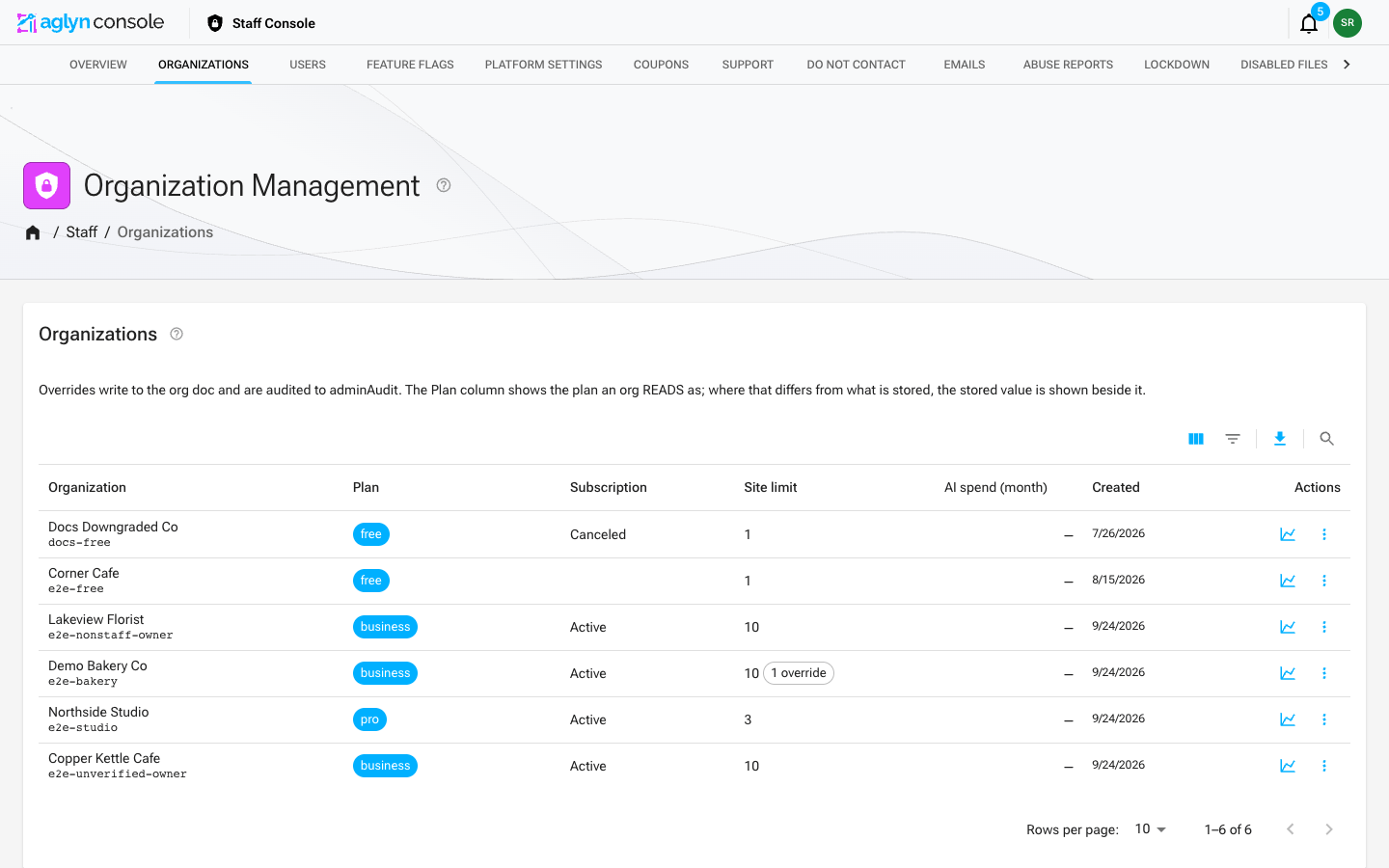
Audited plan and entitlement overrides, suspension, and GDPR-erasure flags, per organization. The directory is listed server-side with the Admin SDK (so it shows every org, not the subset client rules would return), newest first, 10 per page by default (25 or 50 from the page-size menu).
Click the Organization header to sort A to Z, then Z to A, and the Created header to switch between newest and oldest first. The sort orders the whole directory, not just the page on screen. Plan, Subscription and Site limit do not sort: an organization that never had a plan or a subscription stores neither, and sorting on either would leave it out of the list. AI spend (month) sorts the page on screen by this month's figures.
Filter the directory
The grid's toolbar filters and searches the whole directory, not the page on screen. Filters offers Organization (contains a word, or is the whole name), Org slug (is), Org ID (is, or is any of), Owner UID (is, or is any of), Created (on, after, or before a day), and three pickers: Stored plan (the plan written on the org, which is not always the plan it reads as — the Plan column shows both when they differ), Billing status (the Stripe subscription status mirrored onto the org) and Suspended (Suspended shows only organizations whose suspension is in force, Not suspended leaves them out). A timed suspension counts until its end time and not after, the same as the red suspended chip. Search matches the start of any word in the name, using the first word you type, and says so when you type more than one.
Every filter you set and the search apply together, each on its own field, and the chips above the grid show them all. The list keeps the sort you chose, except while Created is filtered, when it runs by Created (newest first unless you chose oldest first), and a note above the grid says so. Some combinations cannot be asked of one query, and the list says so above the grid rather than applying them to part of it: Organization contains together with a search (the filter is shown as "is not applied: cannot be combined with the search — clear the search to use it"), is any of filters holding more than thirty values between them, and a filter it cannot answer at all. A filter that is not applied is named, with its reason, and the rest still narrow the list. See Filter and search a list for the toolbar itself.
Organization detail
An organization's staff page lists its Sites with the same row menu as the Sites list — visit the live site, open its preview, open the site's page — and, below the cards, Emails sent across its sites, then the Email campaigns and Organization automations cards when those plugins are installed. Transfer organization ownership is under Edit organization, and asks for a confirmation before it hands the organization over. Beside it, Hand off to a new owner invites an address to take the organization over, and Ask to upgrade proposes a plan to its owner; see Build a site for a client. The Members card marks a staff member's row staff · no seat, and the seat usage in Effective entitlements counts managers the way the seat gates do, never staff and never site collaborators.
Organization email campaigns
The Email campaigns card, from the Marketing plugin, has two tabs, each paged in id order:
- Sends — every campaign send: its subject and site, status (and held for review when the outbound screen stopped it), how many were sent, opened, clicked and bounced, and when. View message shows the stored message in a frame that runs no scripts and loads nothing; Open design preview opens the design it was composed from, in a new tab.
- Campaigns — the campaign containers, the sites each runs on, and its window.
Free workspace limit
How many free workspaces one account may hold, on a card at the top of the organizations page. Every free quota in the product — sites, media, bandwidth, Assist messages, form submissions, contacts — is counted per workspace, so without this ceiling one account multiplies the whole free allowance by however many workspaces it opens. The default is three.
What is counted is free workspaces the account owns now or created. Three consequences worth knowing before you answer a ticket about it:
- Paid workspaces do not count. An agency or consultant whose workspaces are paid is unaffected at any number. A workspace whose subscription lapses becomes free again and counts again.
- Being invited to somebody else's workspace never counts. A contractor on ten client rosters owns none of them.
- Handing a workspace to another account does not free a slot, because the creator is recorded separately from the owner. That is deliberate: otherwise "transfer it to an alt account, create another, take it back" would be a way round the ceiling. Deleting a workspace does free a slot — the allowance it was consuming went with it.
Changing the number needs the super staff role and is audited with a before, an after and a typed reason. It takes effect within fifteen seconds across the platform and needs no deploy. Lowering it never removes anybody's workspaces: an account already over the new number keeps every one and simply cannot create another. Staff creating a workspace on a customer's behalf are exempt from the ceiling entirely.
A person who hits it sees the number, and is told to upgrade one, delete one, or ask us — so "support raised it for this account" is a real answer. Today that is done by raising the platform number; there is no per-account override.
First-party hosts
The hosts the platform serves itself, on Staff → Platform settings. The first-touch capture treats a visit between two of them as one visit, so only a site that is not ours can be where a sign-up started, and it runs only on a host listed here. Most of the list is built from configuration (the workspace domain and every subdomain of it, and the console, docs and home addresses); add a surface the configuration cannot name — a forum, a status page, another domain — here. Changing it needs the super staff role and a reason, and is audited. See Adding a first-party surface.
Entitlement editor
Full override editor for an organization's entitlements,
its plan, and per-organization release flags. Every override needs a reason
chosen from a fixed list (negotiated contract, support remediation, early access,
correction, sales trial, or other — which requires a note). The reason and note
are written onto the audit row beside the before/after and shown wherever that row
is: the audit log, the organization's own page, and the acting staff account's
trail. The log is append-only, so a reason not given at the time cannot be added
afterwards. The reason is checked by the server that performs the override,
not only by the dialog, so a request without one is refused rather than applied.
The database now refuses a plan, entitlement or release-flag change made any
other way, so that server is the only route an override can take and the
reason cannot be skipped by going around the console.
Changing an organization's release flags needs the super staff role; plan and
entitlement changes are open to billing staff as well.
Clearing an override removes it. Emptying a quota field, or setting a feature
or release flag back to Inherit, deletes that override on save and hands the
organization back to its plan default — one at a time, so the overrides you leave
in place are untouched. 0 is not empty: a quota of zero is a real override,
a cap of none (a comped 0% fee, an organization held to no POS registers), and it
is kept. A quota field that cannot be read as a number of 0 or more refuses the
save rather than being ignored.
The override and its audit row are saved together — either both land or
neither does. Read the message on a failure rather than assuming: it says
"nothing was written … safe to retry" when the server refused the change, and
says the outcome is not known when the request never got an answer (a dropped
connection, a gateway error). In that second case, check the organization and the
audit log before saving again — saving blind would record a before-state that is
already overridden.
Plans and staff comps
The editor opens on the plan as it resolves, not only as it is stored: Effective beside Stored, the subscription's status (marked dead when it is canceled, unpaid or incomplete), and any comp, followed by one sentence saying what decides the plan. Those can disagree. A customer who canceled can still store the plan they paid for, and that stored plan gives them nothing: the organization resolves as Free.
What saving a plan does depends on the subscription:
- Live subscription (active, trialing, past due). The subscription decides the plan. The Stored plan select writes the stored plan as it always did, and the next subscription event from Stripe rewrites it. You can't grant a comp while a subscription is live; the server refuses one.
- Dead or no subscription. A plan chosen in Comp plan is saved as a staff comp. The comp takes effect at once and records the plan, your reason and note, your uid and the time on the same audit row as the rest of the override. The stored plan is left as Stripe last wrote it. Changing the stored plan directly is refused here, because on a dead subscription the change would do nothing. The exception is an organization that never subscribed and had a plan stored directly before comps existed: you can clear that plan, which returns it to Free.
Once a comp plan is chosen, Comp caps sets how the comp holds the organization's bands:
- Capped (the default). Every band is a hard limit at the comp plan's figure, because nothing is sold past it: no AI credit overage, no metered storage or bandwidth, no CRM, API, dataset-storage or email overage. A comped site can hit the bandwidth cap the way a Free site does. To raise one band, type a higher figure into its Quota overrides field. The empty field shows the figure the comp caps it at, and the figure you type becomes its hard limit. A band showing ∞ has no cap on that plan.
- Uncapped, for an internal workspace. While the comp is in force, every band and quota reads as unlimited, whatever the plan or a quota override says. Overrides stay stored and apply again if the comp is capped or removed. The three fee percentages are prices, not caps, and still apply. The platform's own safeguards still apply too: the bandwidth and form submission abuse ceilings, the per-site caps on webhooks, actions and collection entries, email send pacing, the AI assistant's monthly message cap, an operator's AI spend ceiling, and staff pauses and suspensions.
Choosing Uncapped or Capped on a standing comp changes the comp: it is saved with your reason, recorded on the audit row, and the comp's grant is stamped with you and the time. Remove the comp on save removes the comp and its caps setting together, and the organization's own bands apply again.
A comp bills nothing, capped or uncapped:
- Nothing is sold past a band. A capped comp stops at its bands, and an uncapped comp has none to sell past.
- Stripe never sees it. It is never charged, never invoiced, never counted as a card on file, and never counted as MRR. On the staff overview and the revenue page it counts as comped.
- Old purchases don't come back. Add-ons bought on the subscription that ended still don't count.
A comp lasts until it is removed, with one exception. A comp granted with the
reason Sales trial or proof of concept is removed by the platform the moment
the organization's subscription goes live, with an audit row
(org.subscriptionStarted.settle) and an activity entry that say why, so a trial
cannot hand the tier back for free if the customer later cancels. Any other comp
stays: the live subscription outranks it, it shows as dormant, and if that
subscription ends the comp applies again, so remove it when it should end. Only
Remove the comp on save removes one by hand. A save that doesn't mention the
comp, such as a quota edit or an older console tab, leaves it exactly as stored.
The success message quotes the server's account of what took effect, for
example "Pro comp granted. Effective plan: Free → Pro." or "Uncapped
Enterprise comp granted." A plan change, or lifting or restoring a comp's
caps, also refreshes the organization's published pages, so a Free-tier badge
or a paused site clears without waiting for the cache.
The organizations list and the organization's summary card show the effective plan, a stored: chip when it differs from the stored plan, and a comp: chip that says uncapped and dormant where they apply. The override dialog's comp chip does the same, and the organization's AI card says when an uncapped comp is why the workspace has no AI credit band.
Build a site for a client
How staff build a site for a prospect and hand it over. No seat override is needed at any step: staff take none of a workspace's seats.
- Create the workspace and comp it. Sign in with your staff account and create a workspace for the client from the workspace chooser. Staff are not held to the free workspace limit, and your owner row is marked staff · no seat, so the workspace's one Free team seat stays free. In the entitlement editor, comp it to the tier you are selling with the reason Sales trial or proof of concept.
- Build the site.
- Hand it over. On the organization's page (or the site's Ownership card), choose Hand off to a new owner, enter the client's email, and choose whether you Stay on as an admin after the handoff or Leave after the handoff. The client is emailed. The invitation reserves no seat, and when the client accepts they own the workspace and land on its home. Nothing asks them to upgrade.
- The client evaluates with the full tier the comp gives them.
- Ask to upgrade. When the evaluation is done, choose Ask to upgrade, pick the plan, and add a note if you like. The owner gets an email, and the workspace's billing managers see a card on the workspace's home and on Billing with the plan preselected. Withdraw proposal takes it back.
- The owner subscribes from Billing. The comped tier's card offers Start your plan subscription even though it shows as their current plan, and it runs the ordinary checkout.
- It cleans up after itself. When the subscription goes live, the proposal and the sales-trial comp are removed, each with an audit row. A comp granted for any other reason stays dormant until you remove it.
A non-staff owner on a plan with no free team seat cannot hand off and stay on: the handoff is refused when it is sent and points them to Leave after the handoff, because staying would add a second manager the plan does not include. Revoking someone's staff role takes the no seat mark off their rows and pending invites, so they take a seat like anyone else from then on.
Site management
Sites lists every site on the platform, across every organization, read server-side with the Admin SDK so it shows sites you are not a member of. Each row names the site and its subdomain, the Organization it belongs to (a link to that organization's staff page), the organization's Owner, the custom domain, how many pages it publishes, and when it was created. Clicking a row opens the site's staff page.
The row menu holds the ways out of the list:
- Visit live site opens the site's public address in a new tab — its custom domain when it has one, otherwise its platform subdomain.
- Open preview opens the site's home page as its draft renders, in a new tab, without joining the site or impersonating anyone. It is unavailable, and says so, for a site that publishes no home page; open the site to preview any other page.
- Open organization and Open owner go to the staff pages for the organization and its owner.
Filter the site list
The grid's toolbar filters and searches every site, not the page on screen.
Filters offers Site (is the whole name), Subdomain (is), Custom
domain (connected or none), Custom domain address (is), Suspended
(Suspended shows only sites taken down by staff, Not suspended leaves them out;
a timed takedown counts until its end time, as the suspended chip does), Org
ID (is, or is any of), Site ID (is, or is any of) and Created (on,
after, or before a day). A site whose organization is suspended is filtered by
its own takedown only: filter the organizations list to find those. Search matches the start of any word of the site's name, its
subdomain or its custom domain, so bakery finds harbor-bakery.com.
The list is in site-id order, except while Created is filtered, when it runs newest first. A filter one query cannot hold alongside the rest is named above the grid with its reason and not applied. Organization name and owner are not filters because a site does not store them: filter by Org ID, or open the organization, whose page lists its sites.
Site detail
A site's staff page opens from its row in Sites, or from the Sites card on its organization's page. The header carries Visit live site and Open preview (the home page's draft, in a new tab), and a menu to the organization and its owner. Below them:
- Site — the live address, the subdomain (retargeting it needs the super staff role and is audited), and whether the site is published, suspended or in maintenance.
- Ownership — the organization and its owner, each a link to its staff page, with organization ownership transfer and, for super staff, moving the site to another organization.
- Usage, Custom domain, Settings snapshot and the site's Activity log.
- Content — see below.
Site ownership
A site belongs to an organization, and the organization has one owner. The Ownership card names both and can transfer organization ownership to another member of the organization, after a confirmation. It is the same transfer the owner makes from Settings › Ownership: the new owner takes over billing and every site of the organization, and the previous owner stays on as an admin. A transfer that would lock the organization out of its own single sign-on is refused, with the reason shown.
The same card carries Hand off to a new owner and Ask to upgrade, the two steps of Build a site for a client.
Move a site to another organization
Super staff can move a site to a different organization from its Ownership card: pick the destination by name or paste its org ID, then Review. The review shows what the move would do before anything happens, and Move site needs a reason, which is recorded on the audit row. Both organizations' activity logs and the site's own record the move, attributed to staff.
What moves with the site: everything under the site — pages, layouts, components, templates, forms and their submissions, collections, site members, orders. Its access list becomes the new organization's roster: the old organization's members lose access, and the new one's gain it on their usual terms. A dedicated sending domain moves too, with its sending reputation and click tracking.
What stays with the old organization:
- Media in the old organization's library. The site keeps showing it, because pages reference it by address, but only the old organization can manage it — deleting a file there removes it from this site. The review says how many files this affects.
- Records the site made for the old organization: CRM contacts and leads, datasets, lists, and its campaign send history, which names the old organization's lists and consent.
- POS register and collaborator seats assigned to the site return to the old organization's pool.
What refuses a move, each with the reason shown:
- the site is in a consent group, or a group change naming it is running — remove it from the group first, since the other sites read its opt-outs;
- the destination is at its site limit — raise the limit, or tick the override, which is recorded;
- the site has a dedicated sending domain and the destination's plan cannot hold one — release the domain from the site first;
- a campaign send made as the site is still scheduled or sending — let it finish or cancel it.
The review also warns when the destination does not enable a plugin the site uses (its blocks stop rendering), when collaborators of the old organization lose access, and when the destination is suspended. The live site's cached pages are refreshed straight after the move, so it renders under the new organization's plan at once.
Site content
The Content card lists what the site is built from, one tab per kind: Pages, Email designs, Layouts, Components, Templates and Forms. Each tab pages through every document in id order; nothing on it is filtered. A page shows whether it is live and at which path, or a draft, and whether it is in the trash; a form shows its submission count and whether it is retired or archived.
Clicking a row — or its eye icon — opens that document's draft preview in a new tab: what the besigner last saved, rendered with the site's own theme and blocks. You do not need to be a member of the site or impersonate anyone, and nothing you do there changes the site. A published page's menu also has Visit live page.
What a plugin keeps for the site is shown below, by that plugin, when it is installed on the platform — see Automations.
Automations
The Automations card — on a site's page, and Organization automations on an organization's — comes from the Automation plugin. On a site it lists the site's own automations, the organization automations that run on the site (with paused here where the site has paused one), and its workflows; on an organization, its automations and on how many sites each is paused. Automations have no rendering, so a row opens a read-only view of the trigger and the steps. Nothing here runs, pauses or edits an automation.
Emails sent
Emails sent — on a site's staff page, and on an organization's for all of its sites — lists every email the site sent, newest first: the recipient, the subject and the sender tag (a campaign, a form notification, site account mail), what became of it (sent, delivered, opened, bounced and why), and its opens and clicks. It is the same delivery record the staff account page reads, seen from the site instead of the person. Click a recipient, or anywhere on the row, to open the message: the body is fetched from the sending provider on that click — the log itself keeps no bodies — along with the links that were followed. Reading a body is recorded in the audit log. Mail the platform sends to the organization's own members — invitations, billing — belongs to no site and is on each member's staff page. An organization with more than thirty sites reads the first thirty and says so.
Users admin
Staff-claim management and disabling users, with gated listing; a whole email address typed in the search box looks the account up directly. Staff access is granted to an existing account, so if someone isn't found, have them sign in to Aglyn once and then search their email again. Each account opens a detail page showing identity/auth state, staff role, every organization membership with roles and per-site access, and its recent audit trail.
The list's Filters look past the loaded page into every pool: User (the email), Display name, UID, SSO pool and Sign-in providers as typed text, matched anywhere in it; Created and Last sign-in as dates; Suspended picked as Suspended (disabled) or Not suspended, which reads the account's disabled flag (set by Disable account and by a user lockdown, and shown on the row as a disabled chip); Staff claim as true or false; and Staff role picked from support, billing and super. A role picks the claim as stored, so a staff account granted no role (which acts as support) is not matched by support. Search takes a whole email address as an exact lookup, and anything else as part of an email, display name or uid.
Every filter you set and the search apply together, over every account in every pool. Accounts live in Firebase Authentication rather than in a database the console can query, so the list reads the whole directory and matches it: an email is or UID is filter is a direct lookup instead, with the other filters applied to the account it finds. Matches are paged, 200 at a time, and never cut short. The list reads up to 2,000 accounts to answer a filter; past that (or when an SSO pool is larger than the list can read), every filter and the search are shown as not applied, with the reason, and the list is the unfiltered directory until you look an account up by its exact email or uid. See Filter and search a list.
On the detail page, Recent audit trail (what was done by or to the account) and
Data access by staff (who only looked at its data) each page through the account's
whole audit trail, newest first. Their Filters take Action (typed as it is
recorded, such as user.disable), Action group and When (before or after a
date), and Search finds an entry by the start of a word in its action, the actor's
address or uid, its target, scope, reason or note. Filters and search apply to the whole
trail rather than the page on screen, and each filter in force shows as a chip above
the table. Anything the table cannot apply is named in a note above it and left out
rather than applied to some entries (see Filter and search a list).
Activity by this account filters by
action or date through its Filters panel, and its search finds entries by the start of a
word of the address or API key that made them or of the name of what changed — all on the
query that reads the account's activity across every site and organization, newest first.
The action group chips above it are shortcuts for the actions a plugin names.
A Legal acceptances card on the same page answers the two questions a terms dispute asks: which version of the Terms and Privacy Policy this person accepted and when, and whether the 30-day arbitration opt-out window (ToS §18.5) is still open. The window runs from the person's first acceptance of any version, so a later re-acceptance does not restart it. Each row carries the content hashes of the exact documents that were shown, the door the acceptance came through, and the IP recorded at the time. The card is read-only — those records are evidence about the account holder, and nothing in the product can add, amend or delete one.
If the card says the records could not be read, that is not the same as "no acceptance on file": do not answer a dispute from that page until it loads. An account can also legitimately have no record — accounts created before clickwrap capture, and SSO/invite doors, never passed a consent checkbox. Those accounts are asked to accept by a banner in the console the next time they sign in, as is anyone whose accepted version has been superseded by a newer publish.
Acquisition
An Acquisition card on the detail page — and on each organization's page, for the account that created it — says where the account came from in one line ("Referral from g2.com → /pricing → signed up with password"): the first visit's landing page, referrer, campaign tags and ad click ids, the door it signed up through, where it signed up from, and whether the sales workspace already knew the person by address or, as a labeled guess, by name. It is recorded once, at account creation, and read-only. See Acquisition.
Password help
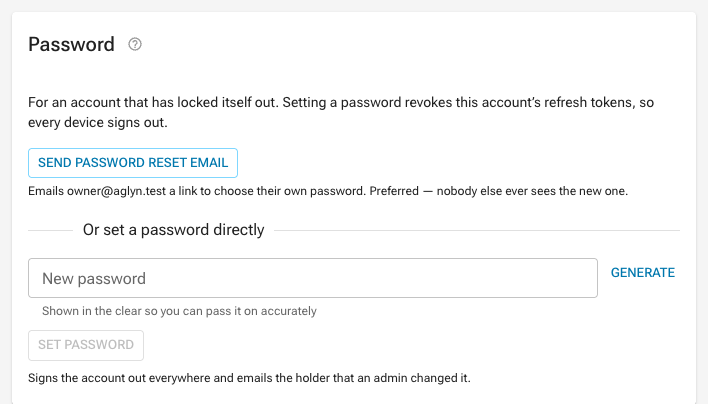
On that detail page, a Password card can email the account a reset link, or set its password directly for an account that cannot receive mail. Setting a password revokes the account's refresh tokens (so every device signs out) and emails the holder that an admin changed it. Both actions need the super staff role and are audited; the password itself is never recorded. An account with no email address supports neither.
Sign one device out
A Sign-in history card on the same detail page lists every device that has signed in to the account — browser and system, location, IP, first and last seen — and can end the sessions on one of them. It is the answer to "someone stole my laptop" when the person cannot reach their own Security tab, which is most of those calls.
Use it instead of Disable. Disabling takes the account away: they cannot then sign in on their phone and carry on working. This does not touch the account or the password.
Read the confirmation out loud before you click it. Two things are true and both surprise people:
- Every device signs out, not just the named one. Firebase has no per-device refresh-token revocation, so the only lever that reaches the stored credential in another browser is account-wide. What is per-device is what happens next: the signed-out device is refused every time it tries to come back, because it cannot produce a fresh authentication, while the account holder signs in again normally and keeps working. The honest sentence is "everyone signs out once, you sign back in, that device does not."
- A page already open on the signed-out device may keep reading and writing data for up to an hour. Anything that goes through our servers stops within about fifteen seconds. Direct database access from a tab that is already open survives until its token expires — security rules key on that token, and they do not ask whether the session was revoked, so the tab keeps whatever write access the account had. It cannot get another token. Uploaded files are the exception: storage is closed to the client entirely, so those stop at once. Say this plainly to the account holder rather than implying the residual is read-only.
If the account holder may still have working sessions they do not recognize — or the device is one you cannot see in the list — change the password too, which revokes on the same terms and additionally takes back the credential.
Super staff only, and audited with the device id and the account. The account holder has the same control themselves under Manage account → Security → Recent sign-ins.
If the card says the registry could not be read, that is not the same as "no other devices": do not tell anyone their account is clean from that page until it loads.
Email delivery
An Email delivery card on the same detail page answers "they say they never got
it." It lists every message we sent the account's addresses, newest first, a page at
a time: the subject, which of our senders produced it, when it was sent and delivered,
and whether it was opened or clicked. Its Filters take Status (a picker, one or
several: Sent, Delivered, Bounced, Spam complaint and the rest), Sender (the
tag exactly, such as invite), Opens and Clicks (equal to a number, for example
0 for never opened),
Sent (before or after a date), and Message (contains a word of the subject).
Search finds a message by the start of a word in its subject, its sender, or the
address it went to, including the domain. Filters and search apply to the whole log
rather than the page on screen, and combine, except that Message and the search both
read the same words: while a search is typed, a Message filter is set aside with a note
saying so. See Filter and search a list.
Read it before you resend anything. The four states that change what you do next:
- Delivered, not opened. It reached the mailbox. Check the spam folder with them rather than sending it again — a second copy lands in the same place.
- Bounced. The mailbox rejected it. A permanent bounce means the address does not exist, so correct the address; a transient one is a full mailbox or a busy server and will clear on its own. A permanent bounce also adds the address to the do-not-contact list, which is why their newsletters stopped.
- Spam complaint. Somebody pressed report spam on a message we sent. Never resend marketing to that address; transactional mail still goes.
- Nothing at all. See the limits below before concluding we never wrote to them.
Open a row to read the message itself. The dialog shows the full envelope — from, reply-to, cc, message id — the timeline with a timestamp per state, the open and click counts, every link the recipient actually followed, and the message rendered as it was sent, with a plain-text tab beside it.
The body is fetched from the sending service at the moment you open it; we do not keep copies of messages, which would mean storing every reset link and receipt we have ever sent. Two consequences worth knowing: a message the service has aged out says so rather than showing you a blank preview, and opening one is recorded in the audit log, because reading somebody's mail is a legitimate support action and a sensitive one.
Links in the preview are inert on purpose. It is rendered in a locked-down frame with no scripts and no navigation, so nothing in a customer's mail can act on your session — and you cannot burn a single-use reset link by clicking it out of curiosity. The links the recipient followed are listed separately, as text.
Opens are approximate; clicks are not. An open is recorded by a hidden image, and most inboxes block images by default — a message with no open was very often read. A click is a real action and can be trusted. Say it that way to the account holder rather than telling them our records show they did not read it.
What the card cannot see. The history is built from delivery events reported by the sending service, which only start when that feed is connected. Nothing sent before then appears on its own — see Import delivery history below. Nor does mail sent to a different address than the one on the account now: the log is filed by address, so an account whose email was changed keeps its older mail under the old one. An empty table is not proof that nothing was sent.
Import delivery history
On Staff → System emails there is an Import delivery history card. It reads the sending service's own record of already-sent mail and files each message under its recipient, which is what puts pre-existing mail on the Email delivery cards.
Run it once after connecting the delivery feed, and again any time the feed was down for a stretch. It is safe to run as often as you like: a message the live feed already recorded is left untouched, and no open or click counts are invented — the history only reports a final status per message, so an imported row shows delivered or bounced but never "opened three times".
Two things imported rows do not carry, because the history does not include them:
- Which of our senders produced the message. That comes from a tag on the send, so an imported row shows the subject and no sender label.
- Open and click counts. Only the live feed reports those. A message that arrived through the import shows engagement only from the moment the feed picked it up.
It needs its own credential — a full-access API key in RESEND_READ_API_KEY. The key
that sends your mail is scoped to sending and cannot read message history, which is the
correct posture for it: a leaked sending key should not be able to list everyone you have
ever emailed. Without that variable the card says so and changes nothing.
If the card says the log could not be read, that is not the same as "we never emailed them": do not tell anyone their mail was or was not sent from that page until it loads.
The record is ours, not the sending service's. It survives that vendor's own retention window, and it survives replacing the vendor.
Staff notes
Free-text support/billing context on each organization's detail page, visible to staff only (never in tenant-readable data) and audited.
Broadcast announcements
Push a product announcement or maintenance notice as an in-app notification to every organization's owner/admins (optionally one plan tier), respecting each recipient's mute preferences; audited.
Billing insight
Every organization's Stripe invoice history and default payment method (with delinquency state) render on its detail page.
Staff → Margin scans organizations on request and ranks them worst margin first. Its per-organization table's Filters and Search choose which organizations the scan reads, across all of them: Organization (contains a word, or is the whole name), Stored plan (a picker), and a search that matches the start of any word in the name. Changing one rescans from the start, and every figure on the page then describes the organizations that match. Month, net revenue, margin and the band readings are worked out from each organization's usage after it is read, so they are not offered as filters, and the worst-first order is the order of the organizations read so far. A filter the scan cannot answer is named above the table as not applied, with its reason — Organization contains together with a search, for one, since both read the same name words. See Filter and search a list.
Refunds
Directly under the invoice history, Refund a charge issues a full or partial
refund against one of that organization's charges without leaving Aglyn. Any staff
role can read the charges and how much of each is already refunded; issuing one
is super, because it is the only staff action that sends money out. A reason is
required, the confirmation names the amount and the charge, and the result is
audited — see the refunds runbook before you use it, particularly on
why a refund is a loss rather than a reversal.
Impersonation
Staff can open the console as a customer account (audited with a required reason, AGL-2125 — the dialog will not submit without one; a pinned warning banner with one-click exit shows for the entire session; staff accounts cannot be impersonated).
System emails
The mail Aglyn itself sends: organization invites, the monthly usage summary, the email copy of console notifications, staff alerts, workspace notices, the CRM digest and task reminders, the weekly insights digest, report receipts and plugin review updates. Each one ships with built-in copy and can be replaced with a designed template built in the besigner, using email-safe blocks only. Set the subject and preheader from the editor's Properties panel; merge tokens the email supplies are listed there, and any token left unresolved is blanked before sending. Reset to default puts the built-in copy back. The list is generated from the emails the product actually sends, so staff edit the system emails that exist — adding one is a code change. Password reset and email verification are Aglyn's own and are fully editable. Billing emails — receipts, failed payments, refunds — are sent by Stripe from its Dashboard and are listed read-only.
Some of these emails are written fresh for each send: a digest's list, an alert's
figures, a notification's title and detail. Their built-in copy is that text in one
merge token, such as {{digest.body}} or {{notification.title}}. A design can put
the token anywhere, add a heading or a button around it, and change the footer's
reason line. Web addresses in a text block become links when the mail is sent.
Every one of them goes out with a header and footer of its own: the Aglyn wordmark, linked to aglyn.com, above it, and below it a line saying why the recipient is getting the mail, a link to support, and the copyright line with Aglyn's postal address. A designed template that places none of the marketing site's email blocks goes out in the same header and footer, less any part it draws itself: a design with its own Header gets only the footer, and one with its own Footer gets only the header. Mail Aglyn sends to its own staff, and receipts to people who filed a report, always use Aglyn's brand. Mail to an organization's people uses that organization's brand. Buttons and links use the console theme's colors, or a white-label organization's brand color when it set one, and a color picked from the theme in the editor goes out as that color. The editor's canvas doesn't draw them, because they are added when the mail is sent; a test send shows them.
The editor also offers the platform marketing site's email blocks, such as its header
and footer, under Your email blocks, and draws them where you place them. They come
from the site that PLATFORM_MARKETING_HOST_ID names; without one, the drawer offers
none. Blocks are made and changed on that site, so Save as reusable component isn't
offered here. Mail sent under the Aglyn brand carries them, and a design that places
them uses them instead of the built-in header and footer — nothing is added around
them. Mail to the people of a white-label organization leaves them out and never
carries Aglyn's header or footer: it gets the organization's own email logo, or its
product name, and a footer with the reason and the organization's support link, if it
set one. On the marketing site, a block's Used by lists the system emails that place
it.
Platform send rate
At the top of the same page. Everything Aglyn sends leaves on one Resend key and the provider's rate limit is per account, so a throttle lands on every customer's password resets at the same time whatever domain each site sends from. This is the ceiling on outbound mail per hour across the whole platform, and it is a value, not a deploy: a sending-domain warm-up or a deliverability incident is handled by changing the number here.
Reputation is not shared the same way the rate limit is. Under a p=reject
DMARC record, a hit is a rejection rather than a spam folder — and which mail it
reaches depends on the domain: the platform's own account mail is on its own
name, a site with a sending domain of its own carries its reputation alone, and
the sites with none share one of four pooled members, which is why only
transactional mail leaves on those.
The card shows the current hour's volume beside the ceiling, because the question during an incident is never "what is the limit" but "are we near it".
What the ceiling can and cannot do. It can defer a marketing campaign and a scheduled bulk sweep (the monthly usage summary). It can never refuse transactional mail — password resets, invites, order receipts, booking reminders — at any value. Those are counted, because the ceiling is about total volume through the provider account, but they send regardless.
Nothing is lost when the ceiling bites. A scheduled campaign over it goes back
to scheduled and the 15-minute processor picks it up in the next window; a
usage-summary run stops without stamping the orgs it did not reach, and the
hourly firing on the 1st and 2nd of the month mails them.
Reading the value needs any staff role; changing it needs super, the same
bar as feature flags, and every change writes an audit row with the before, the
after and the reason typed into the Why box.
Platform suppressions
Also on the System emails page: every address that bounced permanently or reported spam on any send from any site. Nothing in the product mails one until it is released with Release, which asks for a reason in its Why box and writes an audit row. A released entry stays on the list, marked Released with its date, as the record that the suppression was honored while it stood. A Banned account entry can't be released here: it belongs to a banned account, and lifting the ban on Lockdown releases it.
The list's Filters narrows it by Status (Active or Released),
Reason (Bounced, Marked as spam, Recorded by staff, No mail server or
Banned account, one or several),
Learned from (the tag of the send that failed, such as invite), Site ID
(typed exactly), and Last reported (is, is after, is on or after, is
before or is on or before a day). Last reported is the latest failure, so it can
be later than the Since date the table shows, which is when the address was
first suppressed. The search box finds an address by the start of any part of it:
the whole address, the local part, a piece of it such as doe in jane.doe, or
the domain, with or without the @. It reads one word, and matches up to the
first twelve characters typed; a note above the list says so when you type
more. Every filter and the search combine, and all of them apply to the whole
list rather than the page on screen, newest failure first. Each filter in
force shows as a chip above the list; remove the chip to drop it.
Every combination the panel offers is one query, so none is refused; a filter the list ever could not apply would be named in a note above the list and left off entirely, never applied to some rows and not others. See Filter and search a list.
Feature flags
Release-gate console features via Remote Config, with percentage rollout; staff preview everything.
Multi-tenant architecture
How organizations, membership, security rules, subdomains, and billing attribution fit together.
Audit archival
A nightly cron moves audit entries past the 90-day retention window into a Storage compliance trail (JSON lines, month-partitioned) and reminds staff of GDPR erasure requests past their 7-day hold.
Organization suspension
A staff toggle that serves 503s on the org's sites and shows the owner a banner.
Operator alerts
Every event the operator must hear about (a lost dispute, a failed erasure, a red health check, a webhook failing its signature) with its switch and its delivery: immediately, or in one daily digest. Also shows where alert email goes, whether the out-of-band webhook is set, and a Send test for each type. Reading is any staff role; changing is super.
AI monitoring
One organization's AI in full on its staff page — the add-on, the credit pool and its parts, overage and refusals, generation jobs, the people spending the most, and the margin — plus the AI columns on the usage table and the Organizations list, the add-on's share on Margin utilization, and the month's spend leaderboard on Assist signal.
Sales tax return
The quarterly Texas return: pick a period, read the Form 01-114 figures for Texas, see every row the sweep could not fully read, and export the working papers for the Webfile session.
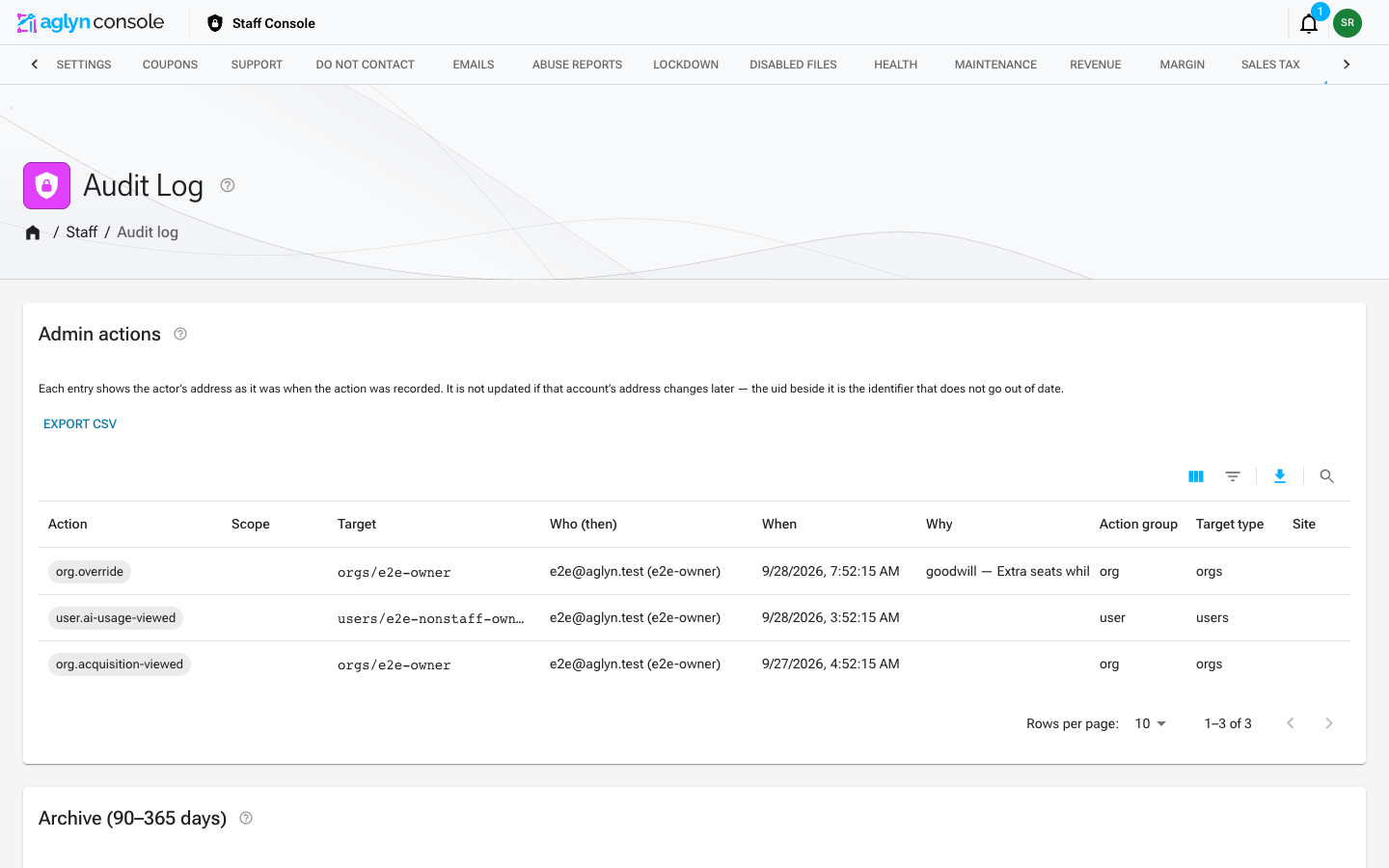
Audit log viewer
A record of staff actions, newest first. Click an entry to read its reason, note and before/after below the list.
The list filters through its table's toolbar, across the whole log rather than the page on screen:
- Action (typed as it is recorded, such as
org.override, or several at once), Who (uid) and Target (the record's path, such asorgs/acme). - Action group groups entries by their namespace, with every AI-related entry — the customer overage controls, the free-spend pause, and the AI actions themselves — under one AI group.
- Target type is the kind of record acted on (
orgs,users,hosts,lockdownsand so on), and Site is the site acted on, by its id: a site itself or anything filed under one. - Scope picks the lockdown, quarantine or report scope an entry was written with.
- When takes one date bound, before or after a date.
- Search finds an entry by the start of a word in its action, the actor's address or uid, its target, scope, reason or note. It matches one word at a time, up to its first twelve characters.
Every filter and the search combine, and each filter in force shows as a chip above the list. The pickers offer every scope and target type the log's writers record, plus any the entries on screen show. A combination the log cannot answer at once, such as two multi-value filters with more than thirty values between them, is named in a note above the list and not applied, rather than applied to some entries. Export CSV exports what the filters and search match, up to 5,000 entries, and says when there were more. See Filter and search a list.
Coupons
Discount codes for Aglyn's own subscriptions. They live in Stripe — the console creates them there and reads them back, so a coupon made in the Stripe Dashboard shows up here and vice versa. Nothing on this page touches the discount codes a customer creates for their own storefront; those belong to the commerce plugin on their site.
Create a coupon takes a name (the text that appears on the customer's invoice), a type — Percent off or Fixed amount off — a Duration of Once, Repeating (for a number of months) or Forever, and optionally a redemption code, a max redemptions cap and an expiry date. A coupon with no code is applied by staff to a subscription; a coupon with one can be typed by the customer at checkout.
The three durations cover the usual deal terms:
| To offer | Choose | What it comes off |
|---|---|---|
| The first month off | Once | The first charge — the first month on monthly billing |
| Off the annual purchase | Once | The first charge — on annual billing, the whole first year |
| The first two (or N) months off | Repeating, 2 (or N) months | The charges in those months — on annual billing, the first annual charge |
| A standing discount | Forever | Every charge |
A fixed amount comes off each charge it reaches, so $100 off an annual purchase is $100 off the year, not $100 a month.
Before you commit, the form shows two readings. Neither stops you creating the coupon, apart from the sign-off a discount of 40% or more asks for.
The full-use cost warning says what the discount spends. A code can be redeemed on
any paid plan, monthly or annual, so the form prices the discount on every one of them as
if the customer used everything the plan includes — every band at 100%, at the
platform's own cost rates — on the charges the chosen duration reaches, after Stripe's
fee. A discount that only spends the margin a plan carries above that cost is marked as
covering it. One that reaches into the cost is shown as a warning: how many plan and
billing combinations it is under on, and for the worst one, what each discounted charge
keeps against what it costs, how far under that is, how many of the first twelve months
it touches, and how the first year covers its cost as a whole. A first-month coupon
can be under cost on its one charge and still leave the year well covered, and the
warning says so. The form also shows the deepest percentage every plan carries on every
charge. The coupon is created either way, and the server returns the same warning with it.
Turning a code back on shows and returns the warning too, and a code a customer types at
checkout is always applied — its verdict is recorded on the subscription in Stripe
(full_use_ok, full_use_coverage, full_use_first_year_coverage) for staff to read,
never shown to the customer.
The net-margin rating is what is left after Stripe's fees and the cost of serving a typical customer. It is illustrative only: the binding check runs on the server when the discount is actually applied, so a rating that looks survivable is not permission.
That percentage is a contribution margin: net revenue less infrastructure COGS, and nothing else. Support, customer acquisition and overhead are not in the figure anywhere, so treat it as a ceiling rather than a profit. The infrastructure number behind it is a per-site floor for almost every organization — measured usage only replaces it once it costs more than the floor, which no organization's usage does yet.
Applying a coupon and quoting a custom price
A coupon applied from an organization's page is judged on that organization: its plan, its entitlement overrides, the sites and seats it bought, the price it actually pays and its billing interval, on the charges the coupon's duration reaches. The card shows the full-use warning beside the net-margin rating, and the apply route returns it with its answer. It does not stop the discount: only the net-margin rating's block asks for Override the margin floor, exactly as before.
The cancel flow's winback discount (50% off for two months) is offered and applied as before. Its full-use verdict on this organization is recorded on the applied winback for staff, never shown to the customer.
The Enterprise custom billing card is the one place the full-use cost is a hard limit. A negotiated price is held to a higher bar: after Stripe's fee it must cover 1.3× what the organization would cost using every band the deal's base plan, its overrides and its add-ons include. The card shows the figure as you type, and provisioning is refused below it, with the floor and the figures in the message. A band that is unlimited cannot be costed, so a deal on one cannot be provisioned until an entitlement override bounds it.
Existing coupons
Existing coupons lists Stripe coupons with their promotion codes, redemption count, and a valid or expired state, a page at a time. The list reads every coupon and promotion code Stripe holds, not a first page of them, and its toolbar filters and searches all of them, not only the page shown: Duration (Once, Repeating, Forever) and Status (Valid, Expired) are pickers; the coupon name filters as typed text (contains, does not contain, equals, starts with, ends with, empty, not empty); the redemption count filters as a number; and the search matches a coupon's name, its Stripe id or any of its promotion codes. Every filter combines with every other and with the search. See Filter and search a list. The fields above the list are the create form, not filters.
Stripe cannot filter or search coupons by any of these, so this list is answered by the console over the whole set it read from Stripe rather than by a database query. Past 1,000 coupons or 2,000 promotion codes it refuses to answer, with a message saying so, rather than filter part of them; the organization page's coupon picker reads the same set and stays empty in that case. A filter the list cannot apply — a field it does not filter by, or an operator that field does not offer — shows a notice above the table, "Filter is not applied: why", and is left out rather than applied to some rows.
Each promotion code carries Activate / Deactivate. Checkout only resolves a code that is active, so a deactivated code is reported to the customer as one we do not recognize — deactivating is how a code is pulled mid-campaign, and activating is how a code that was turned off is put back. Both directions ask for confirmation first and are recorded in the staff audit log; turning a code back on for a discount of 40% or more also asks for the same sign-off creating it would, and shows the code's full-use warning. A discount already applied to a subscription is unaffected either way. The list's Full-use cost column marks each coupon as covering its cost or under it, with the worst plan's coverage; hover it for the figures.
Do not contact
The platform do-not-contact list for phone numbers — calls and texts. It is not the email unsubscribe list; email opt-outs live with the campaign that sent them.
Aglyn sends no marketing calls or texts today, and the page says so: there is no consent record behind them yet. The list exists so that an outbound program has something to check the day one starts, and so that an opt-out we receive now is not lost.
Record a request is for an opt-out that arrived outside the product — by email to privacy@aglyn.com, or spoken on a call. Give the number, how the request arrived (Email, Said on a call or Other / staff), the channels it covers (Calls, Texts or both), and a note. Replying STOP to a text will be handled automatically once texting exists; this form is for everything that does not arrive that way.
If they also asked us to delete the number we hold, tick that box and give the account uid. The number stays on the suppression list — that is the only thing that keeps it from being dialled again — and what is deleted is the copy on their profile, with SSO blocked from re-asserting it on the next sign-in.
A suppression outlives the contact record, and it can be undone: a number the person later opts back in for is marked Opted back in rather than removed, so the history of what was asked and when survives.
Suppressed numbers lists every record, most recently changed first, a page at a time, and its heading counts every number currently suppressed across the whole list, not only the page on screen. It has no filters or search.
Access
Access is gated on a staff claim, enforced per handler and by scoped Firestore
rules. The area doesn't advertise itself: /admin/* returns a plain 404 to anyone
without the claim, and the Staff console entry is hidden from the account menu
rather than shown-and-refused.
Deeper runbooks for staff operations live with the platform ops docs, not in this public site.
Which identity holds staff
A staff claim lives on one Firebase Auth user record, and Aglyn has more than one pool of them: the project-level pool, plus a separate pool for every organization using SAML SSO. The same person can exist in two pools with two different records, and a claim on one is invisible to the other — which is why a grant can look successful while the person still gets a 404.
Staff can be granted to any identity. SSO is an option, never a requirement:
- an SSO identity in Aglyn's own tenant;
- an identity in the project pool, signing in with a password or Google;
- an SSO identity in a customer organization's tenant.
All three are valid and supported. When a grant is made, the audit row records the pool alongside the uid, because a uid on its own does not identify an account when two pools can hold the same one.
Staff inside a customer's tenant — a property worth knowing
If a staff claim is granted to an identity that lives in a customer's SSO tenant, that customer's IdP administrator controls authentication for it. They cannot mint a staff claim — the claim is Aglyn's — but they control who can authenticate as the identity that holds one, and they control whether it keeps existing.
This is allowed and sometimes unavoidable. Two things make it safe to live with:
- prefer granting staff to an identity in a tenant Aglyn controls, where there is a choice;
- treat a customer-tenant staff grant as a reviewable row: it is exactly what a staff-access review should be looking at, and the staff user list shows the tenant so it is not an undifferentiated email address.
Offboarding
How a staff person is removed depends on which identity holds the grant:
- Revoke the staff claim in the users admin. This is the step that always applies, and it targets the pool the identity actually lives in.
- Disable or delete the account in whichever directory owns it — Google Workspace
for an
@aglyn.comidentity, the customer's IdP for a customer-tenant identity, or Firebase Auth directly for a project-pool account.
Revoking the claim is not instant on its own: a claim change reaches a signed-in session at its next ID-token refresh, which the console forces once per page load, so a reload picks it up within about an hour at worst. When speed matters, disabling the account and revoking its refresh tokens ends the session immediately.
Break-glass access
One consumer Google account — outside the Workspace domain, in the project pool
rather than the SAML tenant — holds super staff permanently and by design. It is
not an oversight, not a migration leftover, and should not be "tidied up" — it is the
account that still works when SSO does not. Which account it is belongs in the
password manager, not in a published page: naming it here would hand an attacker the
one identity that is outside Workspace enforcement. If SAML is
misconfigured, the IdP is down, or a domain rule is set wrong, this is the way back in.
It is a deliberate trade, and the cost is real: an identity outside Google Workspace has no enforced MFA, no central offboarding, and no admin session revocation. The whole mitigation sits on the Google account itself —
- strong two-factor, ideally a passkey or hardware key;
- a unique password, never reused anywhere;
- treated as a privileged credential, because it is one.
The rule below is written so it can never refuse this account: the account is on an ungoverned domain, so it falls outside the rule by construction rather than by an exception someone has to remember to maintain.
Requiring SSO for a company domain
An operator can require that every identity on a given email domain authenticates through a specific SSO tenant. The point is narrow: an address on a company domain that signs in with a password or a personal Google account looks like a company identity while being governed like a personal one — outside the directory's MFA, offboarding and revocation.
This is a rule about a domain, not about staff. It applies whether or not the person is staff, and it never requires staff to use SSO. Staff on other domains are untouched.
Two settings, both empty/off by default:
| Setting | Meaning |
|---|---|
AGLYN_SSO_REQUIRED_DOMAINS | domain=tenantId pairs, e.g. example.com=example-tenant. Empty means no domain is governed. |
AGLYN_SSO_DOMAIN_ENFORCEMENT | on to refuse non-compliant sign-ins. Anything else is off. |
Both must be set for anything to be refused, and only one case is ever refused: an address on a governed domain signing in with no SSO tenant at all. An identity on a governed domain that signs in through a different tenant is allowed and flagged for review, not blocked.
These default to empty, so a self-hosted install governs nothing unless its operator configures it — with their domain and their tenant. Aglyn's own domain is not compiled in anywhere.
Turning enforcement on is a one-way door for anyone it refuses, so before flipping it:
- confirm SSO staff access works through a real sign-in, not a token inspection;
- migrate or retire every existing identity on the governed domain that has no tenant — including automation accounts, which are easy to forget and will simply stop being able to sign in.
Why am I getting a 404?
/admin/* returns a plain 404 with no explanation, deliberately — a stranger should
not learn the staff console exists. That makes a genuine staff member's failure hard
to tell apart from a broken route.
GET /api/auth/staff-self-check, with your own ID token, answers it. It reports the
uid, email and pool of the session you are actually signed in as, whether that token
carries the staff claim, and — if your own address exists in more than one pool —
which of those records holds the grant.
It only ever reports on the caller's own identity, so it discloses nothing about anyone else and cannot be used to find out who is staff.