Publisher handbook
Everything a marketplace publisher needs. The developer side (building the bundle) is the first-plugin guide; this is the marketplace side.
Before your first publish
- Publisher profile (Marketplace → Profile) — your handle and display name appear on every listing. Publishing is organization-owned: the listing belongs to your organization, not your personal account.
- Publisher agreement — accept it once, on behalf of the organization. It is offered wherever you start a publish, and it is always on Marketplace → Profile. See The publisher agreement.
- Plan: publishing requires a Pro plan.
- Payouts (paid listings only): complete Stripe Connect onboarding from Marketplace → Payouts. The platform fee is 20% (30% on free plans).
The publisher agreement
Your organization — not you personally — is the publishing party, so the organization accepts the Marketplace Publisher Agreement once. Only an owner or admin can accept it, because only they can bind the organization, and we record who accepted it and when.
You do not have to go looking for it. When your organization has not accepted the current version, the agreement opens in a dialog wherever you are publishing — the plugin publish page, or the publish dialog for a component, layout, site template, theme, email template or dataset schema — as soon as you open it, and again if you submit without accepting. Accepting there records the same acceptance as Marketplace → Profile does, and the publish you started then goes ahead with everything you filled in. If you are not an owner or admin, the dialog names the people in your organization who can accept it.
You can read the agreement in full at aglyn.com/legal/marketplace-publisher-agreement, alongside the rest of the legal center. The version in force is stated at the top of that page, and it is the same string the panel records against your acceptance.
It is a different thing from the pre-publish checklist, and they are not interchangeable:
| Publisher agreement | Pre-publish checklist | |
|---|---|---|
| About | The relationship | The bytes in this bundle |
| Scope | Your organization | One version |
| Asked | Once, and again when the terms change | Every publish, including a republish of the same version number |
The summary shown above the accept button is the part that tends to surprise people later — the license you grant us to host, verify and distribute; what you warrant about each version; that you cannot recall code already installed; that we can disable a version everywhere without notice if it looks dangerous; that review is a safety screen and not an endorsement; and that on paid listings we process the sale, pay your share into your own Stripe Connect account less a platform fee, and collect and remit sales tax — while refunds, chargebacks and support on your artifacts stay with you. Read the full agreement before accepting.
If we change the agreement, publishing stops until someone who can bind your organization reads and accepts the new version. The dialog lists what changed since the version your organization accepted, so you can read the edited sections rather than the whole document again. An older acceptance is never carried forward — that is the whole reason the agreement is versioned. Nothing already published is affected, and reviewers can see which version each publisher is under.
Where to publish from
Publishing lives at the organization level — Marketplace → Publish. Pick a source site, then what to publish:
- A component — a reusable component from that site.
- A layout — a published layout from that site.
- A dataset schema — the field model of one of your organization's datasets. Records are never published — only the structure travels.
- An email template — a transactional email you've designed for that site (only emails that already have a saved design are offered).
- This entire site — its published pages and theme, as an installable template.
Dataset schemas are the one exception to the source-site picker: datasets belong to the organization rather than to a site, so the picker is hidden and the schema publishes from the org directly.
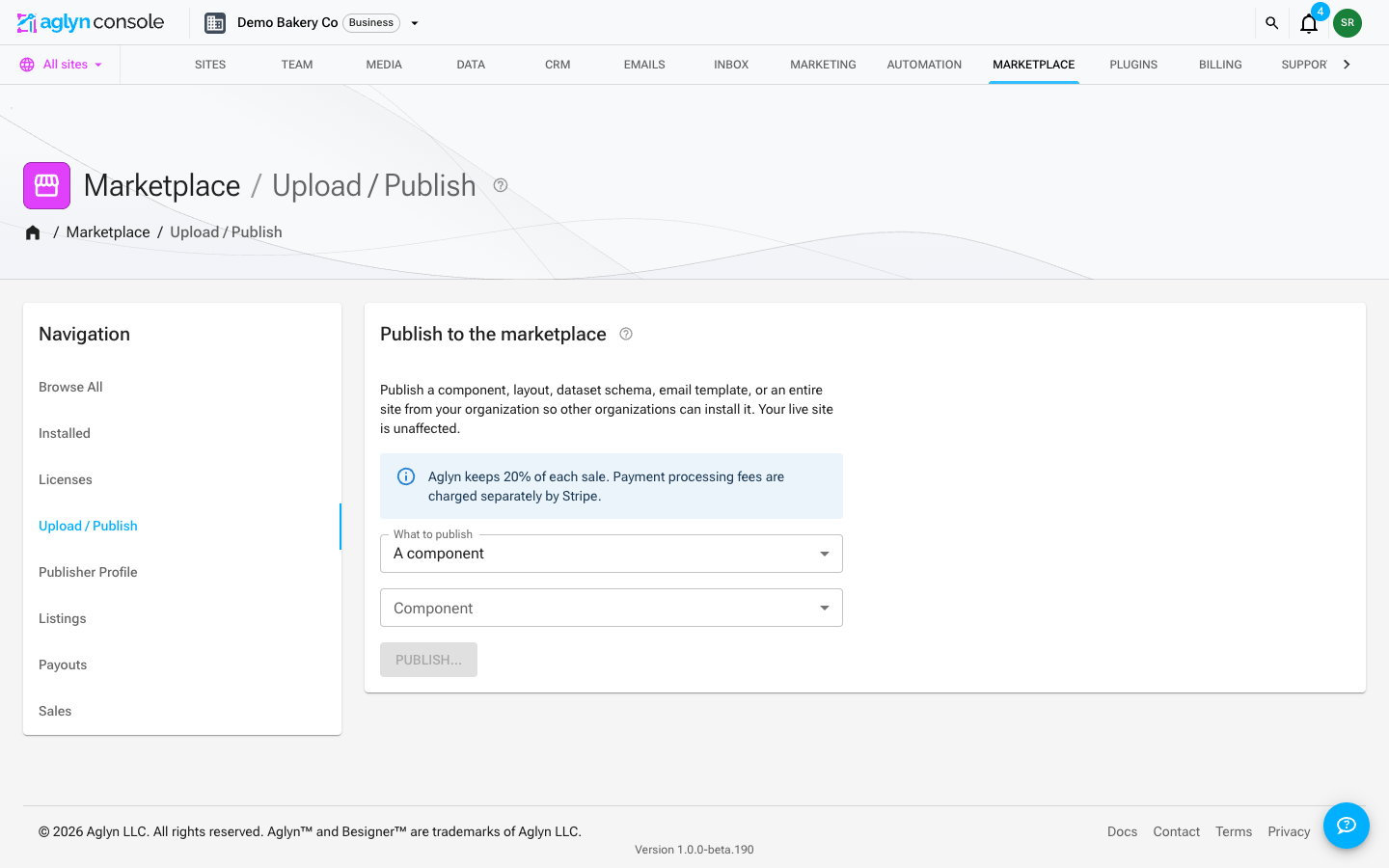
The per-site shortcuts still exist for convenience — the Publish actions on a site's Components and Layouts pages, and Publish as template on the Setup page — and open the same listing form.
What installing each type does
Installing never changes a running site. What that means per type:
| Type | Where it lands | Live immediately? |
|---|---|---|
| Component | The site's components | Yes, once you place it |
| Layout / Site template | The site's Templates library | No |
| Plugin | An org or per-site version pin | Yes |
| Dataset schema | A new, empty dataset in the org | Yes (it's new) |
| Email template | A draft version of that email | No |
| Email starter | A new email in the site's Email templates list | No |
Three details worth knowing before you publish one:
- A dataset schema installs as a brand-new dataset every time; it never
merges into an existing one, since a schema change over existing rows would
reinterpret live data. The new dataset is shared with every site in the
installing organization.
referencefields are relinked by display name to that organization's datasets that are also shared with every site, and any that can't be matched are degraded to plain text — the installer is told which ones. - An email template installs as an inactive version of the same catalog
email it was designed for. The site owner activates it in the email
designer, so installing can't silently replace an email a site is already
sending its customers.
emailHtmlblocks can't be published at all. - An email starter is a campaign email, not a catalog one. It belongs to no key, so it installs as a brand-new email the buyer owns outright — install it twice and the site has two. It is a copy: nothing you publish afterwards reaches a site that already installed it, and nothing they edit reaches you.
Rules an email starter has to meet
A campaign email you publish is loaded inside somebody else's recipients' mail clients and sent from a domain every Aglyn site shares. Three rules follow, and publishing refuses rather than quietly stripping what breaks them, so you find out at publish time rather than never:
- Images must come from your media library, be a site-relative path, or be
inline
data:images. An image loaded from any other host tells that host who opened the email, when, and from where — a read receipt for you, on the buyer's customers, with no consent basis. That rule catches a tracking pixel and an ordinary hero image alike, because they disclose the same thing. - Links must be
https:,mailto:, or a path on the sending site, and no link or image address may contain a merge tag — recipient data does not go in a URL. Every outbound domain your design points at is recorded on the listing and shown to the buyer before they install. - Rich text blocks are not published. Their content is raw markup, which is
why
emailHtmlis excluded too. Build the design from the other email blocks and it renders through our own renderer on the way out.
Email starters are auto-listed like every other non-plugin artifact, so a version is not reviewed unless a person at Aglyn reviewed that version — an earlier approval and a Verified badge on the listing say nothing about it. Buyers are told which they are getting. If a design turns out to be harmful, taking the listing down also stops every site that already installed it from sending it; their copy stays where it is and stays editable.
Plugins are different: a plugin is a code bundle, not a site artifact, so it's published from your built bundle (below) rather than the source-site picker.
Publishing a version
Run the local verifier first — the publish API enforces the same checks and rejects with the exact problem list:
node tools/scripts/verify-plugin-bundle.mjs dist/plugin.bundle.mjs manifest.json
The verifier parses your bundle rather than reading it as text, so it sees
what a source scan could not: property access computed at runtime on
globalThis/window/document, the Function constructor reached through
.constructor(), and import() with a specifier it cannot resolve. All of
those are refused.
Declare every origin you call. The verifier collects your fetch,
XMLHttpRequest, WebSocket and sendBeacon calls and diffs them against
capabilities.network in your manifest; an origin you call but do not
declare fails the publish. This is the same list your plugin's CSP is built
from, so an undeclared call would have been blocked at runtime anyway —
failing here means you find out at publish time instead of in production.
A URL your code only knows at runtime cannot be checked, so it is reported
as a warning and a reviewer will ask about it.
Calling through a local name does not change the answer: const f = fetch,
const d = globalThis.fetch and const {fetch: h} = globalThis are all
resolved back to fetch, and a URL kept in a constant — a plain string, a
template, or a concatenation of them — is read rather than shrugged at. What
is not read is a name that gets reassigned, shadowed by a parameter or
declared twice; there the value at the call site would be a guess, so the
call is reported as a URL known only at runtime.
If you hand a URL to a helper the checker cannot follow, it says so rather than reporting no network calls — so declare the origins your plugin talks to and the row goes quiet on its own.
Pass the manifest (as above, or leave it beside your bundle or one level up) or the network checks can only warn locally while the publish API still rejects.
It also warns — without failing — about things a reviewer will want
explained: machine-obfuscated _0x… identifiers, large embedded base64
blobs, and a bundle that is one unreadably long line. Minified code is fine;
these are the shapes minifiers do not produce.
The output lists every area it checked, not only the ones with findings, with the same four states a reviewer sees on your submission:
| Meaning | |
|---|---|
✓ | The check ran and found nothing |
✕ | A refusal — the publish will fail |
? | Worth explaining, but not a refusal |
— | Not checked. Something stopped the check from running — a bundle that would not parse, or a network diff with no manifest |
A — is not a pass. If you see one, fix what stopped the check before you
submit, or a reviewer will ask you the same question with days of queue in
between.
Then publish it from the console: Marketplace → Publish, choose
"A plugin (upload a bundle)", and follow Publish a plugin… to
/<your-org>/marketplace/publish/plugin. It is a page, not a dialog, so
you can link it, reload it, and leave it half-finished — what you have
typed is kept as a local draft until you publish or discard it.
The one thing the draft cannot keep is your bundle and manifest files: a browser will not let a page hold a file across a reload, so you re-choose them, and the page says so rather than pretending it is ready to publish.
The sections are: bundle and manifest (choose the file or paste the JSON), listing (name, description, category, README, changelog, repository URL, license), who can install it and for how much, and the pre-publish checklist. Publishing always publishes sandboxed — a reviewer verifies and signs a version before it can run trusted.
The README here is the same rich-text editor you get when you edit the listing later — toolbar, media picker, and a Markdown source toggle for when you are pasting a README you wrote elsewhere. It is the document reviewers read first and buyers read before running third-party code, so it is worth the room.
Paste a repository README as-is. The editor renders two heading sizes
and clamps every # run onto them, so the # Project Name a README opens
with becomes the larger heading and #### or deeper become the smaller
one — you do not have to re-level anything by hand.
The changelog has two audiences, and it is worth writing for both: the reviewer, who compares this version against the last approved one, and every installer who reads it on your listing's changelog tab before deciding to update. On a first version there is nothing to compare against — say what the plugin does instead, or leave it empty.
Before you publish
The last section of the page asks you to confirm a short checklist, in full view of the publish button, and publishing is blocked until you do:
- The repository URL is public and contains the source for this bundle
- A license is included and you have the right to publish this code
- The README documents what data the plugin reads, stores or sends, and where it goes
- Every declared network host is required — the ones you don't use are gone
- You have tested this version on a site you control
- The listing doesn't disparage Aglyn, quote what its plans cost, or sell a way around one — see What your listing can say about Aglyn
- The changelog describes what changed since the last version — asked only when you're updating an existing listing
The first item has a field to go with it: Repository URL is asked for on the publish form itself, and publishing is refused if you confirm the item without filling it in — an attestation about a repository we never collected is a statement about nothing. It's recorded on the version too, so a reviewer opening v1.0.2 gets the repo you declared for those bytes, even if you move the code later.
These aren't paperwork. They're the questions that send most submissions back, so answering them up front is the fastest route through the queue. Your answers are recorded against that exact bundle with your name and the date, and the reviewer sees them beside their own checklist — which also means republishing the same version number asks again, because the bytes changed.
Each publish uploads your bundle (content-addressed by sha256 —
immutable; a new build is a new object), writes a version document
with your manifest and changelog, and bumps the listing's
latestVersion. To ship an update, bump version in the manifest and
upload again — see Shipping a new version.
There's a daily publish cap per publisher.
Review: what happens after you publish
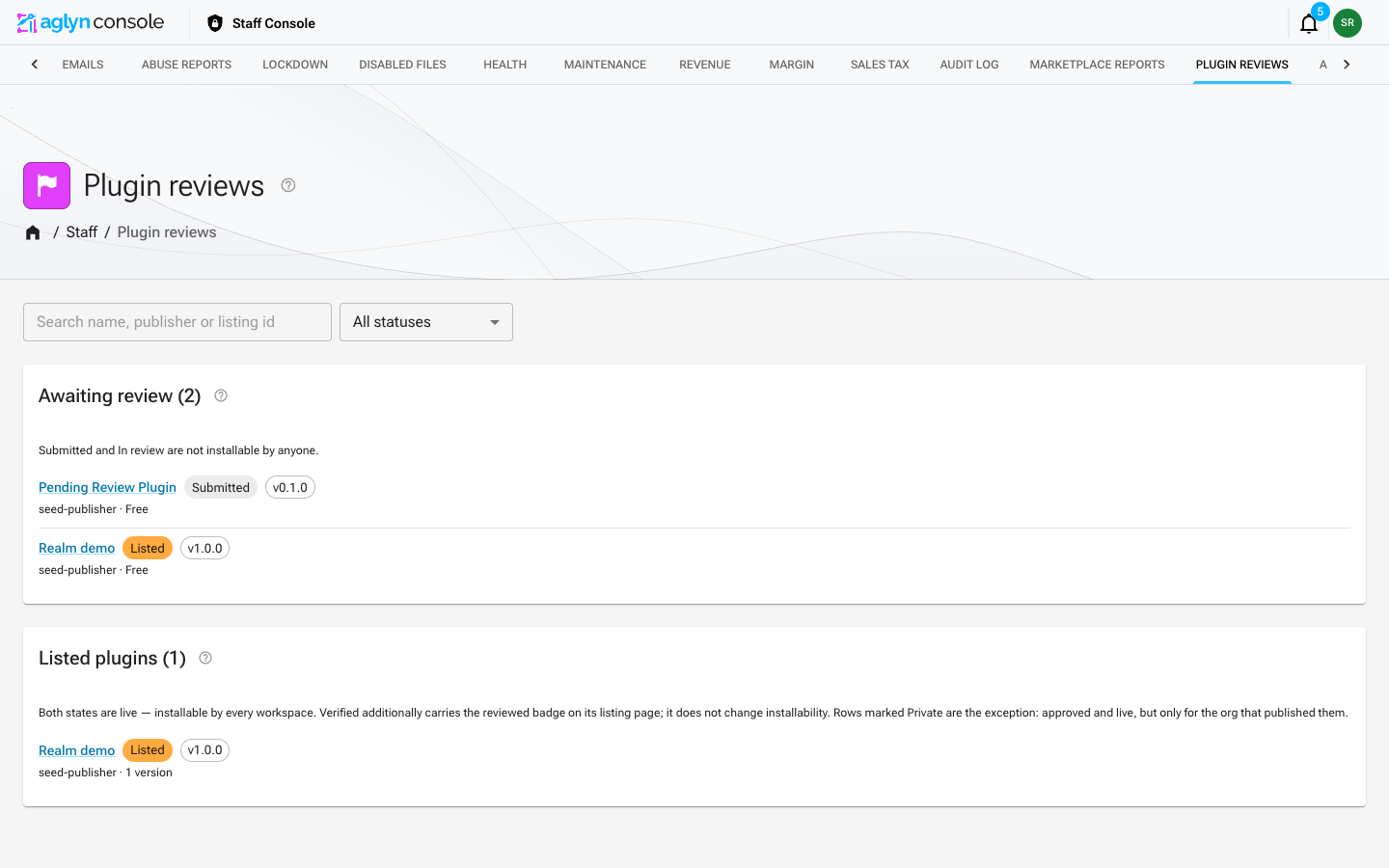
New plugin listings enter the queue as submitted and don't appear in public browse until staff list them. Reviewers see your listing content, declared capabilities, and a fresh static-verification run. Outcomes:
- Listed — publicly browsable.
- Verified publisher ✅ — a badge on you, not on any one release. See below.
- Rejected — you're notified with the reason; fix and republish.
- Realm trust (separate, rare): staff may additionally sign a version so it runs in the app realm instead of the sandbox — first-party-grade placement for plugins that earn it.
The two badges, and what each one promises
The marketplace shows two separate claims, because they answer different questions and conflating them would let one vouch for the other:
| Badge | What it means | Scope |
|---|---|---|
| Verified publisher | A human at Aglyn confirmed who you are and that your listing describes what your code does. | The publisher. It survives a version bump. |
| Reviewed | A reviewer completed the checklist against these exact bytes ({version, sha256}). | That one version. |
Publishing a new version clears the Reviewed badge and puts the release back in the queue — including on a listing whose publisher is already verified. That is deliberate: the badge is a statement about code someone read, so it cannot follow code nobody has.
Your Verified publisher badge is unaffected by a version bump. Buyers see both, so a new release from a verified publisher reads honestly: we vouch for you, and we have not read this release yet.
Until a version is Reviewed, its listing page carries the standard "review the publisher and docs before installing" note. Being a verified publisher does not remove it — the plugin still runs sandboxed either way.
Speed the review up: a real README, a license, sane capabilities
(request only the network origins you use), and working links — which is
exactly what the pre-publish checklist above asks you to confirm. A
confirmation that turns out to be false is a dated statement by a named
publisher, and it's grounds for removal.
Asking to be verified
Verification used to be something only a reviewer could start, which meant there was no way to ask and no sign that asking was allowed. There is now a Request verification button on your own listing page, under Review status.
You can ask once your plugin is listed — that is, live and installable. Before that, the review queue already has your submission for a different reason, and a badge on something nobody can install would not mean much.
What happens next:
- Your plugin stays listed and installable the whole time. A verification request never changes what your buyers can do.
- One request at a time. You can withdraw it while it is waiting.
- If it is granted, the Verified publisher badge appears on your listing.
- If it is declined, you are told why, and you can ask again 30 days after the decision. A decline is a refusal of the badge, not a verdict on your plugin — nothing about your listing changes.
Asking does not make verification more likely on its own. It is the same bar described above: we have to be able to confirm who you are, and to agree that your listing describes what your code does. Getting those two things in order first is what actually moves it.
Verification is free today. We may charge for it in future; if that happens it will be announced before it applies, and it will not affect badges already granted.
Testing a version before it is approved
You can install your own unapproved version, on your own sites. That is deliberate — the checklist asks you to confirm you tested these exact bytes, and you cannot test a version you cannot install. Nobody else can install it until a reviewer approves it, and a private listing is invisible to everyone else regardless.
The install says so when that is what it is: the button reads Install unreviewed vX for testing, and the confirmation spells out the part worth pausing on — every site you can install to is publicly reachable. There is no staging site here, so an unreviewed bundle installed to a real site serves real visitors until you uninstall it. Prefer a site with no traffic, and uninstall when you are done.
Your listing's Review status card warns you when an unapproved version still has live installs, so a test install cannot quietly become permanent.
Watching your own submission
Open your own listing and the Review status card — visible only to you — answers what an email cannot:
- Which version installs today, from the newest approved version rather than the newest one you published. When they differ it says so: "v1.0.3 is in review. New installs get v1.0.2 until it is approved, and anyone already running it stays where they are."
- Every version's state in words — In review, Approved, Rejected, or Published before review for versions that predate per-version review and so carry no verdict at all.
- Why a version was rejected, on the version it belongs to.
- What you confirmed on the pre-publish checklist for those exact bytes, so you can see the claims you already made before making them again.
Two things it states that you would otherwise have to infer:
- Editing your listing while a version is in review changes nothing about the review. Name, description, README, screenshots and links go through a different path, because approval is about the bundle's bytes.
- The bytes are never edited. Changing them means publishing a new version — there is no "resubmit" for a rejected one.
A rejection does not uninstall anything. If you installed the version to test it — which you are encouraged to do, and which only your own organization can do before review — that install keeps running the rejected bytes on your site. The rejection notice tells you when this applies to you; uninstall it or roll back to an approved version. Review can also stop a version outright, and then every site pinned to it renders a placeholder instead of the plugin.
When a live version is disabled
Revocation is not rejection. A rejected version never went live; a disabled version passed review, shipped, and was then stopped by the platform. There are two ways that happens: a listing-wide takedown, which staff cannot do without recording a reason, and a per-version kill switch that stops one version and leaves the others installable. Where a reason is on file, both you and the sites running the version are shown the same one.
What you see. On your listing's Review status card, a disabled version carries a red Disabled chip beside its review chip rather than instead of it — the version is still approved, and that is worth knowing, because it means the problem is not your submission. Under the row, an alert repeats that nobody can install the version and that sites already running it render a placeholder, followed by the reason on file and the date it was disabled. When no reason was recorded, no reason line appears — rather than an empty one that would read as no reason given. Who disabled it is not shown; that belongs to the audit log.
The card also stops crediting a disabled version with installs. If the version that was installing today is the one that got pulled, the card leads with that instead: it is still your latest approved version, nobody can install it, and publishing a new version is what clears it — the same bytes cannot be re-enabled by editing the listing.
What a site owner sees. On Marketplace → Installed, their entry for your plugin gets a red disabled chip next to its version, and an alert saying the platform disabled this version and that it renders a placeholder on their site until they upgrade or uninstall it. The same recorded reason and date appear there, so the explanation your customers read is the one you read. Their two ways out are the two buttons already on that row — upgrade to a later version if one exists, or uninstall.
Private plugins
Choose Only this organization under Who can install this when you upload, and the listing becomes private: never browsable in the marketplace by anyone, and installable only by your own organization's sites. That last part is enforced when the install is requested, not by hiding the page — knowing a private listing's id gets a stranger nowhere.
Private changes the audience, not the bar. Your bundle still runs on Aglyn infrastructure and still reaches the host ABI, so it goes through the same queue, the same reviewer checklist, the same static verifier, and the same super-staff signature if it ever needs realm trust. Staff see private submissions in the queue marked Private.
Private plugins are always free, and you find yours under Marketplace → Listings rather than in Browse — View opens the same detail page you install from.
Going public later takes no re-review: the bytes were already approved, and who may install them was never part of that approval. It does ask for what any marketplace listing needs first — a description, a README, and a license — via Make public on the Listings row. Going back to private is always available and takes effect immediately.
Authoring your listing
Your listing IS your storefront — it renders on the detail page every buyer sees. Editable at publish time or any time after, no republish needed: open Edit listing on your own listing's detail page (the whole page becomes the editor), or use the Edit action on Marketplace → Listings.
| Field | Guidance |
|---|---|
| Name | The display name on every browse card and at the top of the detail page; ≤80 chars. A typo here is fixable without republishing — leaving it blank keeps the current name rather than clearing it. |
| Description | The one-line summary under the name on browse cards; ≤500 chars. |
| Body (About) | The main docs: what it does, setup, what it adds, data & permissions. Rich-text editor with headings, bold/italic, links, and inline images; ≤20k chars. |
| Preview image | The hero shown on browse cards and at the top of the detail page — pick it from your media library. |
| Logo | Square; pick from the media library or paste an https URL. |
| Screenshots | Up to 6, from the media library or https URLs; the detail page shows a gallery with click-to-zoom. |
| Categories | Up to 3 from the fixed taxonomy. |
| License | Short label (e.g. MIT) — listings without one get flagged in review. |
| Homepage / repository | Public links build trust; reviewers check them. The repository is asked for at publish and required — editing it here changes the listing, not what past versions declared. |
Be explicit about data & permissions in the README: what your plugin reads/writes and every host in your manifest's network allowlist — unverified sandbox listings show buyers a risk disclaimer, and good docs are what overcomes it.
What your listing can say about Aglyn
Your listing renders inside Aglyn's own console, on the page a customer is reading while they decide whether to upgrade. That is why this one has a rule attached: a plugin sold as "the cheap way out of Business" is doing its selling with our pricing page, not with your plugin.
Fine — say all of this:
- What your plugin does, and how well it does it.
- Which Aglyn plans or features it requires: "needs the Pro plan", "uses custom domains", "requires the datasets API".
- Which plans or features it is compatible with, stated as fact.
- What it costs, and what a buyer gets for it.
Not fine:
- Disparaging Aglyn or the platform ("Aglyn's built-in analytics are useless").
- Stating or implying what an Aglyn plan costs or contains ("Business is $X for features you won't use", "the Pro plan caps you at 5 sites"). Plans and prices change; a listing that quotes them goes stale and misinforms buyers who trust it.
- Comparing your price against ours ("half the price of an upgrade").
- Naming, framing or marketing the plugin around avoiding, replacing or discouraging an Aglyn plan or upgrade — "Skip the upgrade", "Business features without the Business plan", "don't pay for Pro".
The line is simple: describe your plugin, not our pricing. If you need a customer to know they must be on Pro for your plugin to work, say exactly that — a requirement is a fact about your plugin, and it belongs in the listing.
This is §3(h) of the publisher agreement, you confirm it at every publish, and a reviewer checks the title, description and README against it. A listing that crosses it is rejected with the reason rather than quietly edited, so you get to fix your own words.
Versioning & updates
Shipping a new version
Publish new version on your listing — the button on the listing's own detail page, or the action in the row menu on Marketplace → Listings. It opens the same publish page bound to that listing, so you upload the new bundle and manifest and write a changelog rather than describing a listing you already own; name, description, README, license, repository and price arrive filled in from the listing and are yours to edit.
What the page tells you, because it is the part worth knowing: the version that installs today keeps installing until a reviewer approves the new one. Nobody is upgraded onto unreviewed code, and nothing you publish can change a version somebody already has.
Two things it will stop you on:
- A mismatched manifest
id. An update is recognized by your publisher organization plus the manifestid— so a bundle carrying a differentidwould create a separate listing, not a new version. The page says so and refuses rather than letting you find out from a duplicate listing you cannot un-publish the bytes of. - The changelog confirmation. On an update the pre-publish checklist asks for it up front, because here we know it applies.
Who can install it is fixed when the listing is created and a new version never changes it — change that from the listing itself.
- Artifacts are immutable and installs pin
{version, sha256}— you can never change the code a consumer runs; ship a new version instead. - Users update explicitly (an Update to vX action appears when your
latestVersionpasses their pin). Write a changelog every publish — it renders in the detail page's Version history card, where every published version is listed with its changelog, a Latest marker, and a Realm-trusted chip on versions that carry it. That card is what a cautious buyer reads before installing, so a thin changelog costs you installs. - Declare
hostAbiin your manifest; when the platform bumps its ABI you'll rebuild against the new template and publish a compatible version (installs warn, loaders refuse, until you do). - Most platform changes are not an ABI bump, so don't wait for one to
pick up new capability. The ABI describes the host object your bundle is
compiled against — React, the JSX runtime and
aglyn. New optional fields on the schemas you author (a component'stags, say) reach you without a bump: your existing bundle keeps working and simply doesn't set them, and you adopt them whenever you next publish. A bump means the host object itself changed, or something you were relying on became required.
How installs work (the buyer side)
Browse is a catalog — cards link to the detail page, which is the
only place an install happens. The buyer picks targets (all sites,
selected sites, or org-wide for plugins), confirms a dialog that
names exactly where the install lands, and the pin is written: your
exact {version, sha256} pinned to the site or org, the plugin enabled
for the workspace, loaded on their next visit. Buyers can uninstall from
the listing's own detail page (Uninstall, or Uninstall org-wide
for an org-scope pin) as well as from Marketplace → Installed —
removing the pin and disabling it. Data your plugin created stays, so
reinstalls resume cleanly. Paid listings require purchase before install;
you see sales in your publisher ledger.
The detail page shows two install figures side by side: installs is the cumulative all-time total and only ever grows, while active counts the organizations and sites that currently hold a pin — it goes down when someone uninstalls. A big gap between the two is churn worth investigating.
A purchase licenses the buyer's organization, and Marketplace → Licenses lists what the workspace holds and what the buyer bought across every workspace, one table each. Each table filters through its own toolbar: Search finds a license by the start of a word of its listing's name, and Filters offers Bought by (You) on the workspace's table, and Licensed to — which workspace a purchase landed in, or Every workspace you belong to for a purchase that names none — on the buyer's own. Both answer over every license, not the page on screen, and each filter in force shows as a chip above it; the tables keep their own order and their column headers do not re-sort them. A word that more than 30 listing names share is refused with a note asking for more of it. See Filter and search a list.
Every listing shows its artifact type as a chip — Plugin, Component, Site template, Layout, Dataset schema, Email template or Email starter — so buyers know what they're getting before they open it. Dataset schemas and email templates read "Added (v1) · add again" rather than "Installed", because adding one creates a new dataset or a new draft email each time; re-adding is a legitimate action, not a no-op.
Ratings and comments: any signed-in user can comment on your listing; star ratings are reserved for verified-email accounts in an organization that actually installed it. The publishing organization can never rate or comment on its own listing.
Getting paid
One-time prices in whole USD: $0 (free), or $3 to $1000. Purchases flow through the platform's Stripe; your share (80%, or 70% on free plans) pays out via your Connect account. The Marketplace → Sales tab tracks every sale.
Your share is calculated on the pre-tax price. Buyers also pay sales tax on top of it, which Aglyn collects and remits under its marketplace-provider registration — that money is never yours and is not part of your payout. The Sales tab reports net paid out, the amount that reached your Stripe account, with what buyers paid, the tax and the platform fee shown beside it.
Refunds and lost chargebacks are excluded from that total: your share is pulled back from your Connect account, and the amount returned is listed separately.
The $3 minimum on paid listings
A paid listing must be $3 or more. Type less than that into any publish form and the price field turns red, the hint says why, the publish button holds, and the publish route refuses it — the same figure in all four places.
The reason is the payment processor's per-transaction cost: a percentage of what the buyer pays (the price plus sales tax) plus a fixed amount per transaction. That fixed amount is what makes small prices uneconomic — it does not shrink with the price, while the platform's 20% cut does. At $1 processing the payment costs about $0.36, more than the $0.20 platform fee, so the sale loses money for the platform that has to settle it.
The minimum is not a round number picked for effect: it is the cheapest whole dollar at which the platform's cut covers the cost of collecting it, computed at the 20% take rate — the band that breaks even latest, so the number holds whichever plan you are on — and against the most expensive payment method a buyer may choose. If those change, so does the minimum.
Zero is not below the minimum. A free listing takes no payment at all and so costs nothing to process; it stays available at any time, and it is often the better answer for something you were about to charge a dollar for.
Listings priced under $3 before this minimum existed are left alone: an existing price is never changed for you. The floor applies the next time that listing is published or a new version of it goes up.