Feature Flags (release gating)
Feature flags are managed from the staff console and require a staff claim; publishing changes requires the super staff role.
Release flags control whether a feature is launched — a separate axis from plan entitlements, which control whether an organization's plan includes a feature. A customer sees a feature only when it's released and their plan allows it.
How a flag is evaluated
Every check runs client-side against the activated Remote Config template, with the registry's code defaults as the offline fallback:
The rollout hash is seeded with the flag key and the organization, so a workspace keeps a stable verdict across sessions and different flags don't share buckets.
How gating behaves
- Customers with a flag off don't see the feature: its dashboard tab disappears and deep links show a "coming soon" notice instead of the page content.
- Staff always see every feature. A flagged-off feature is marked with a flag icon on its nav tab and a warning banner on the page, so an unreleased surface is never mistaken for a launched one.
- Percentage rollout: a flag that's off can be rolled out gradually. The verdict is deterministic per workspace (hashed from the org), so a workspace keeps the feature once its bucket is inside the rollout percentage — no flapping between sessions.
Managing flags
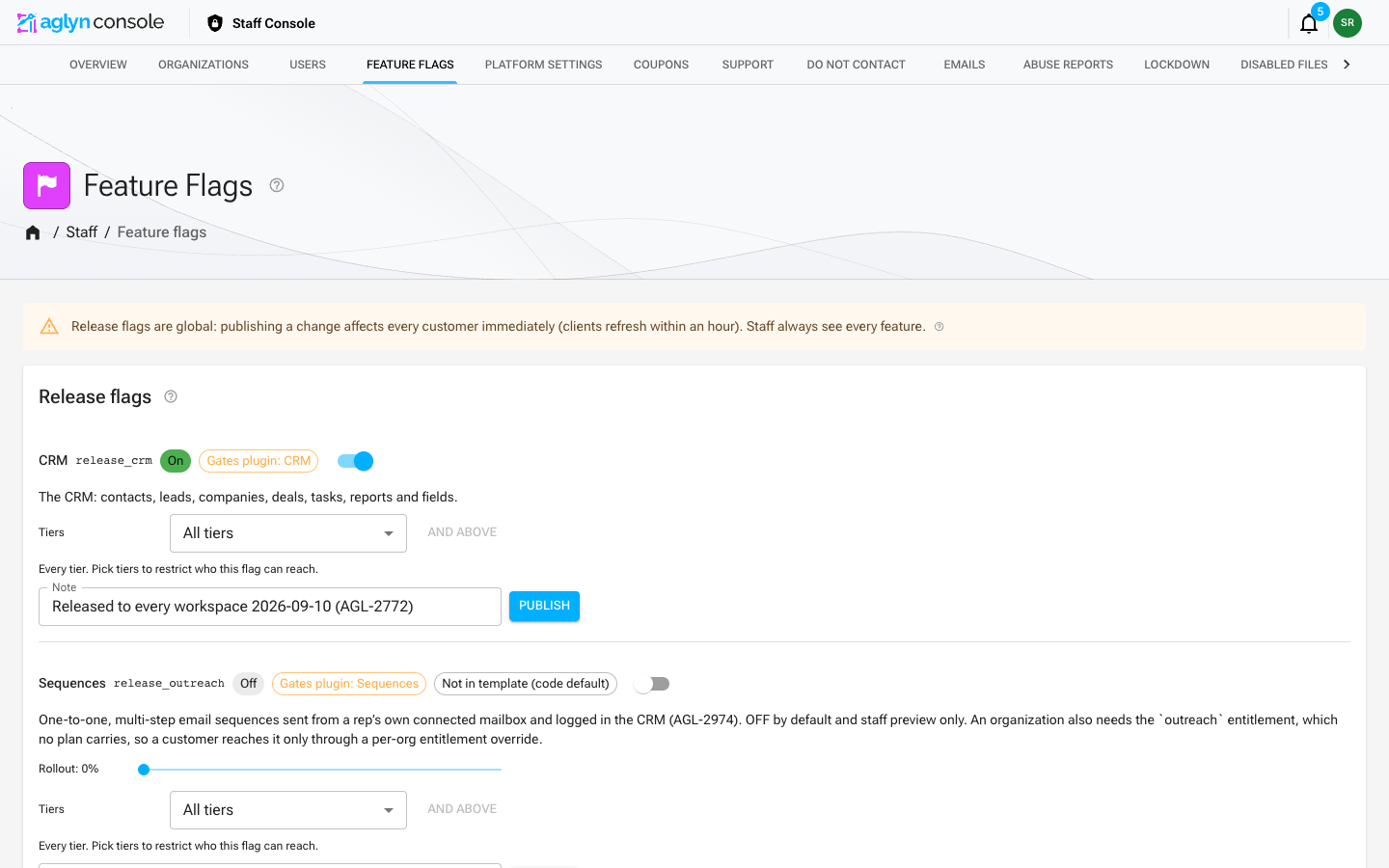
Open Staff → Feature flags. Each registered flag shows its live value from Firebase Remote Config:
- Toggle — on for everyone, or off (with optional rollout).
- Rollout slider — 0–100% of workspaces while the flag is off.
- Note — free-form context ("waiting on AGL-199", owner, launch date).
Publishing is immediate and global: clients pick up changes on their next Remote Config fetch (within an hour, or on the next full page load). Every publish writes an entry to the audit log, and concurrent edits are etag-guarded — if another staff member published first, the page reloads the latest values instead of overwriting them.
Reads are open to all staff roles; publishing requires the super role, matching user management.
Under the hood
- Flags live as JSON parameters (
release_*) in the Firebase Remote Config template;cloud/firebase-remoteconfig.template.jsonseeds them (firebase deploy --only remoteconfig). - The registry of flags — keys, labels, code-side fallback defaults, and which nav tab
each governs — is versioned in
@aglyn/aglyn(release-flags.ts). A plugin's flag is defined by the plugin itself, in its catalog row'sreleaseFlagDefinitioninplugins.config.json, and compiled into that registry. Adding a flag means adding a registry entry (or a plugin's definition), seeding the template, and wrapping the page in<FeatureGate>. - If Remote Config is unreachable, the registry defaults gate — a default-off feature never flashes on while offline.
- The registry default and the seeded value must agree, and a spec now enforces it
(
release-flags-template.spec.ts). They are read in different situations — the code default when Remote Config is unreachable, the template when it is not — so a disagreement ships the same build with a feature on in one environment and off in another, with neither looking wrong enough to be reported. The spec also fails on a registry flag that was never seeded, and on a seededrelease_*no code declares. - Remote Config refuses a parameter description longer than 256 characters, and a
single one over the limit fails the whole publish. The registry description is
written for this page and can run longer, so a publish sends it only when it fits.
Otherwise the parameter keeps its live description, or, on a first publish, gets the
registry description cut at a word boundary. The spec above also holds every seeded
description within the limit, so
firebase deploy --only remoteconfignever trips it.
A flag is not always sufficient on its own
release_native_checkout (in-page storefront checkout, AGL-1944, released to every
workspace 2026-10-06 by AGL-3606) is gated on the flag and on
NEXT_PUBLIC_STRIPE_PUBLISHABLE_KEY being set. A ui_mode Checkout session returns a
client secret and no redirect URL, so a browser that cannot mount the form has nowhere to
send the buyer — flipping the flag without the key would turn a storefront's Buy button
into a dead one. The storefront routes require both and otherwise serve the hosted
redirect. The console's plan checkout no longer renders Stripe Checkout at all, so the
flag has no console surface.
The key lives on aglyn-tenant, the Vercel project that serves storefronts, for
production, preview and development (added 2026-08-23; an earlier 2026-08-18 check had
found it only on aglyn-console). Turning the flag off, globally or for one org,
returns those storefronts to the redirect. Note that vercel env ls cannot see
team-shared variables; check through the REST API.
Worth copying whenever a flag turns on a path that needs configuration the flag does not itself provide: gate on the capability, not just on the intent.
release_video_delivery (AGL-2824) follows the same pattern three times over. A
workspace's video is copied to the delivery provider and served from it through a
short-lived signed redirect only when the flag is on for its org, the provider's settings
are present, and a copy made from the video's current bytes exists. The settings are split
by what each app does: the console, which writes copies, needs the four R2_* values; the
console and aglyn-tenant both need MEDIA_VIDEO_DELIVERY_HOST and
MEDIA_VIDEO_DELIVERY_SECRET to mint URLs. Grant it to one org through its override rather
than a rollout: a copy is that customer's video at the provider, and the provider must be
on /legal/subprocessors before any customer's is. Videos stored before the flag turned on
are copied the next time they are replaced, restored or given a rendition; until then they
serve from the platform.