Business profile
Every AI job for a site starts from what the site already knows about the business: its name, what it does, its services, the area it serves, who it is for, its tone of voice, the year it was founded, and the contact details you entered. Aglyn AI writes for this business instead of guessing, and it never makes up a way to reach you.
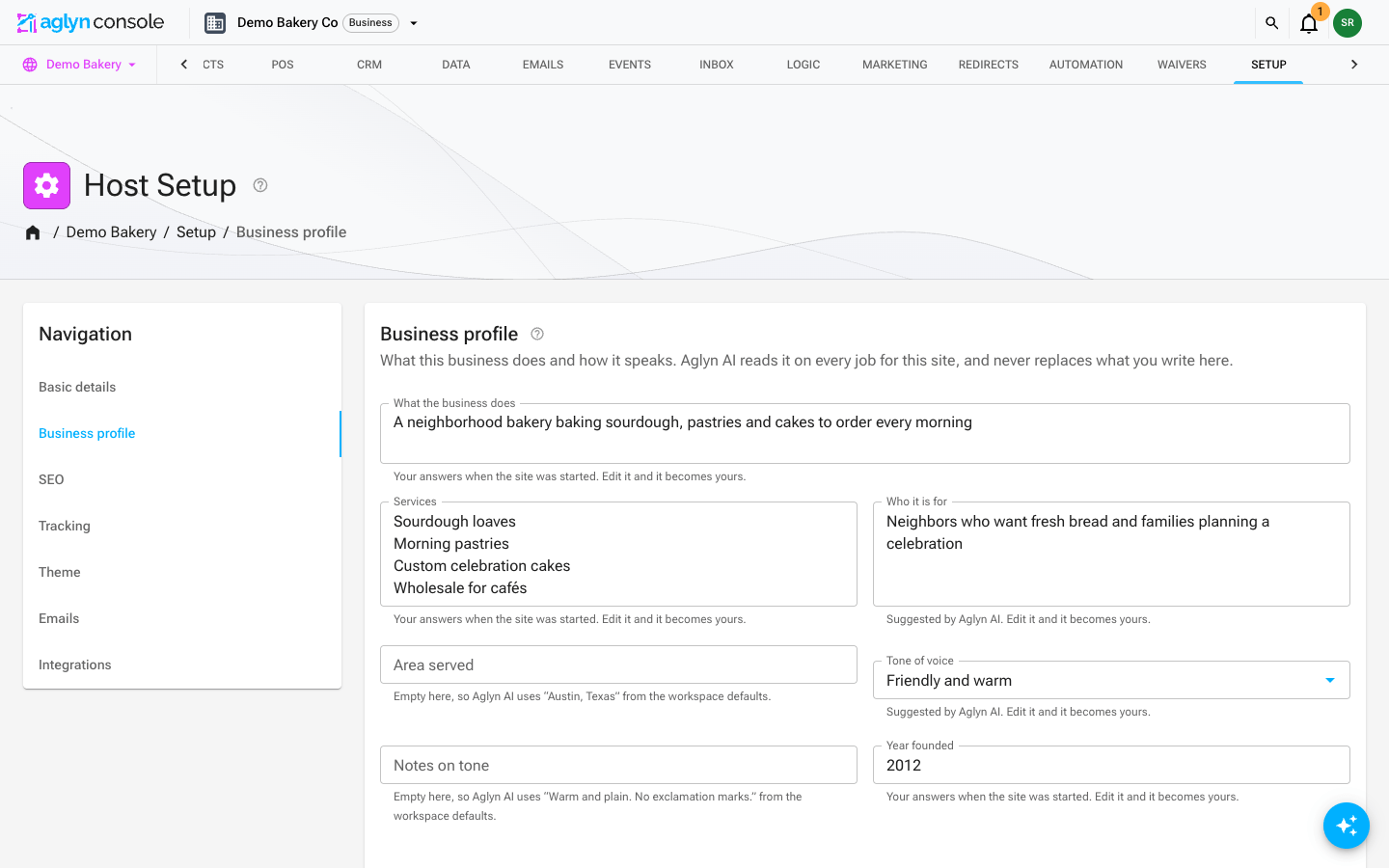
Where to edit it
Open the site, go to Setup → Business profile. The page has three cards:
- Business details: your business name, slogan, phone, email, address and social links, entered once for your pages, emails and search listings alike. See Business details.
- Business profile: see the Business profile card.
- What Aglyn AI learned: the preferences it took from edits you applied.
The Business profile card
The Business profile card holds what Aglyn AI writes for:
- What the business does, in a sentence or two;
- Services, one per line, up to 12;
- Who it is for;
- Tone of voice: Friendly and warm, Professional and clear, Playful and upbeat, Premium and refined, or Plain and direct, and Notes on tone for anything else;
- Year founded, as four digits, such as 2015. An About page or a "Since" line uses it instead of leaving a gap where the year would go.
Aglyn AI reads it on every job for the site and never replaces what you write here.
The area you serve is not on this card: Aglyn AI reads it from Areas served on Setup → SEO → Local business, the one place it is entered.
Where the values come from
When a site is started with Aglyn AI, the profile is filled from your answers to the guided start, including the Year founded from More details, and from what the plan wrote about the business. Each field says where its value came from:
- Your answers when the site was started, or Suggested by Aglyn AI: a suggestion. Edit it and it becomes yours.
- An empty field that Aglyn AI still has a value for says so: the description in your SEO settings, or the workspace's default.
What you type is never replaced. A later job can fill an empty field, but it never overwrites one you wrote, and a field you cleared stays clear.
Workspace defaults
Settings → Profile has a Business profile defaults card. A site uses those values wherever its own profile is empty, so a workspace that runs many sites for one business writes them once. Changing them takes the Business profile permission, which workspace owners and admins hold by default. The year founded is set on each site's own card. The default Area served is used only by a site whose Areas served on Setup → SEO → Local business is empty.
Contact details are never invented
The name, email, phone, address and social profiles come only from Business details on Setup → Business profile, and the business type and opening hours from Setup → SEO → Local business, exactly as entered. A detail you have not entered reads Not entered, and Aglyn AI writes the sentence without it instead of making one up or leaving a gap for you to fill. The same goes for prices, reviews and testimonials.
What Aglyn AI learned
When you apply an Assist edit that shows a preference, such as asking for shorter copy, a friendlier tone, no emoji, or removing a testimonials section, Aglyn AI keeps that as a short preference for the site. Later jobs read it.
This is Aglyn AI's memory for the site. It learns only from edits you applied, never from ones you dismissed, and by fixed rules rather than another AI request. It can learn:
- a tone: Prefers a casual, friendly tone or Prefers a formal, professional tone;
- a length: Prefers short, concise copy or Prefers detailed copy;
- Does not want emoji in copy;
- a kind of section you remove, such as testimonials and reviews, FAQs, pricing, stats, logo strips, newsletter sign-ups, team or gallery sections.
It keeps up to 12 preferences per site, and sends six of them with each job.
The What Aglyn AI learned card lists each preference and how many applied edits it was seen in. Choose Forget this beside one to forget it, or Forget all to clear the list. Later jobs stop using what you forget, and Aglyn AI learns again from the edits you apply next. Anyone who can edit the site can see and clear the list. A preference replaces an opposite one: asking for detailed copy after asking for shorter copy keeps only the newer one.
Which jobs read it
The site's plan, every build Assist plans for the site, Assist's edit turns, and analytics insights read the profile. Insights read what the business is, never its contact details. Free and paid workspaces get the same profile.
The profile is sent as one short block, at most about 400 tokens, that is cached for the site, so it adds almost nothing to what a job costs.