Bookings & Scheduling
Bookings turn your site into a scheduling tool: define services, publish your availability, and let visitors book time — with optional payment and automatic reminders.
Paid. Paid bookings use Stripe; reminder emails are included.
A paid booking is a destination charge into your own Stripe account, so the booking widget cannot take money until Stripe Connect onboarding is finished and Stripe reports charges enabled. Until then a visitor who picks a paid service is told "Payments are not set up yet" and the slot is not held. Free services are unaffected — they never touch Stripe. Connect your account from the Payments card on the Products hub; see Commerce.
Set up bookings
- Define services (what can be booked, duration, price).
- Configure availability — the windows when slots are offered.
- Add the booking widget to a page as a canvas element.
Draft services
A service is either active — it takes bookings — or a draft: set up, and offered nowhere. A draft is left out of the booking widget's list, shows no open times, and a booking for it is refused, even through a link that names it.
- A service you add with Add service is active as soon as you save it.
- A service set up for you elsewhere in Aglyn, rather than added on this page, starts as a draft, so nothing goes live before you have looked at it. If no price was given, it is set to Contact for price.
- On the Bookings page a draft carries a Draft label and an Activate button. Activate puts it on your site straight away.
- Deactivate turns an active service back into a draft: it stops taking bookings without being deleted, and the bookings it already has stay.
A draft counts toward your plan's service allowance, like an active service.
Price varies, free estimate, or contact for price
A service that is quoted at the job doesn't need a price. In the service's dialog, Show the price as picks how the widget states it:
- The price (the default): the widget shows the price, and a priced service is paid through Stripe when it's booked.
- Price varies, Free estimate or Contact for price: the widget shows that label instead, and the service books with no charge, like an estimate appointment. Any price typed in the dialog is neither shown nor charged, and you quote the visitor afterwards.
A labeled service needs no connected Stripe account, because nothing is charged.
Asking for a phone number and an address
The booking widget always asks for a name and an email. A service can also ask for a phone number and an address — the place the job is, for a service done on site. Set each one in the service's dialog under Booking form:
- Don't ask (the default) — the field does not appear.
- Optional — the field appears and the visitor may leave it empty.
- Required — the visitor cannot confirm the booking without it.
The booking is checked again when it arrives, so a required field cannot be
skipped. A phone number has to look like one: a US or Canadian number is
stored in international form (+15125550107), and a number written another
country's way is kept as typed.
What the visitor gives shows:
- on the booking in Upcoming bookings;
- in the New booking notification the site's managers get, by email too if they have email notifications on — for paid bookings as well, once the payment clears;
- on the meeting the booking files in the CRM, under the slot.
The phone number is also added to the person in the CRM — the lead or the contact the booking lands on — only when that person has no phone yet, so it never replaces a number you already have. The address stays on the booking and the meeting, not on the person: it is where this job is, which is often not where they live.
Taking bookings
- Visitors pick a slot through the booking widget; the booking API records it. The widget shows two weeks of open days at a time, with every open time of the day the visitor picks, grouped into morning, afternoon and evening. Later dates pages on through your whole booking horizon (60 days unless you change it in the plugin's settings).
- For paid services, Stripe collects payment and a slot hold prevents double-booking during checkout.
- Reminder emails go out automatically ahead of the appointment — see below.
24-hour reminders
Every confirmed booking gets one reminder email roughly a day before it starts. A background pass runs each hour and mails the bookings that are then 23–25 hours out, so a reminder lands about 24 hours ahead rather than at an exact minute.
A booking is reminded once. The pass records that it has sent, so a booking is never mailed twice, and these do not go out for canceled bookings or for bookings taken without an email address.
The reminder uses your designed booking reminder email template if you have one, and your own brand if your plan includes white-labeling; otherwise it sends a plain text reminder naming the service and the time.
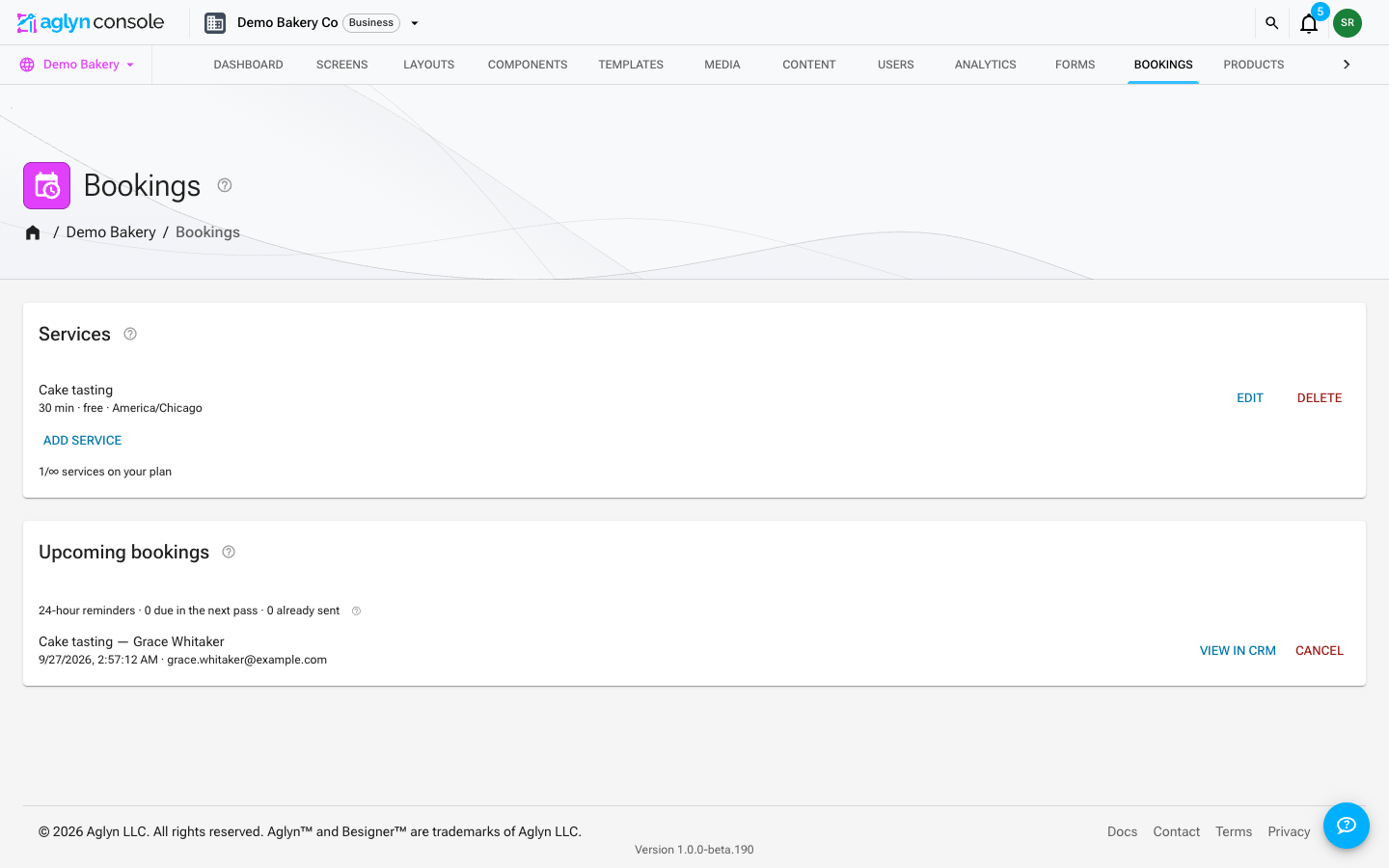
Where to see it. The Upcoming bookings card shows 24-hour reminders · N due in the next pass · N already sent, counted with the same rule the sender uses — so it is
the queue that will actually be drained, not an estimate.
Payments and fees
Money for a paid booking goes to you, not to Aglyn. The charge is created on your connected Stripe account, and Aglyn takes its platform fee out of it as the Stripe Connect application fee — the same way a storefront sale works.
- A booking is priced as a service, which bills at your plan's digital transaction rate: 5% on Starter, 3% on Pro, 2% on Business, 1% on Scale, and 0% from Advanced up. It is the same rate and the same ladder as digital products — bookings are not charged separately or additionally.
- The fee is taken on the service price only. Stripe's own processing fee is separate and comes out of your account as usual.
- Your current rate is shown on the Payments card of the Products hub, and the full ladder is on the plans page.
Service tax
Paid bookings charge no tax by default, and that stays true for every site that does not change it.
A service is not goods: the sales-tax rate configured for your store is a goods rate, and whether a service is taxable is a different question with frequently the opposite answer. So Aglyn does not apply your store's sales rate to an appointment. Instead, Commerce → Settings → Taxes → Service tax is where you set your own rate for it.
When you set one, Aglyn adds it to the booking charge as its own receipt line using the label you choose, and records the amount and the regime on the booking. It is always your own rate — Stripe Tax is never asked to compute it, because it has no service tax code for this and would apply a goods rate to an appointment.
The platform fee is charged on the service price, never on the tax.
Aglyn applies the rate you enter and records what was charged. It does not determine whether service tax applies to you, at what rate, or where it should be paid. Confirm your obligations with a qualified tax professional.
Manage
Use the console bookings page to see and manage upcoming appointments.
Each upcoming booking carries View in CRM, which opens the booker's contact — the CRM's Contacts list asked for their address, moving straight on to the record when exactly one person matches. A booking taken without an address has no link. A contact's timeline links back to this page from the booking that captured them.
Booking from the CRM
A contact, a lead or a deal in the CRM carries Book a meeting whenever this site runs Bookings and your plan includes it. It lists the site's services, each with the public link a visitor books it at — the page the booking widget sits on, with that service preselected — and a copy button. From Send email on a record, Insert booking link drops the chosen link into the message where the caret is.
Every link dropped from a record carries that record with it, so the booking lands on the right timeline even when the person books with a different address. A booking taken without a record reference is matched to a contact by the booker's address instead. Links are per service, not per person: a service has one calendar, so there is nothing narrower to link to.
Each service has two switches in its dialog:
- Log a meeting on the CRM record when this service is booked (on by default) — a confirmed booking is filed as a meeting on the record's timeline, titled with the service and the slot.
- Create a follow-up task on the CRM record when this service is booked (off by default) — a Follow up after <service> task is filed on the record, due one business day after the slot, on whoever holds the relationship.
Neither files anything on a site where the CRM plugin is switched off, and a booking is filed once however many times its payment confirmation is redelivered. A contact's page links back here through Bookings on this site, which is this page narrowed to every booking taken with their address, upcoming and past.
Canceling and refunding
Canceling a booking reopens the slot. For a paid booking, canceling also refunds the visitor through Stripe — the button reads Cancel and refund and tells you the amount before you confirm.
- The refund pulls the money back out of your account and returns Aglyn's platform fee on it, so a refunded appointment costs you nothing in fees.
- If the refund fails, the booking is not canceled. The appointment stays on the list and the message says what went wrong, so you never end up with a canceled slot the visitor was never paid back for.
- Refunding is site-admin only, because it moves money.
- Bookings paid before this was supported have to be refunded from the Stripe dashboard instead — the console will say so, and will remind you to tick Reverse transfer so the amount comes back from your account rather than Aglyn's.
Export bookings
Export in the header of the bookings card downloads the site's bookings as a file.
- Which bookings. The list you're looking at — Upcoming bookings, or one person's bookings when the page is narrowed to them — or every booking the site has taken.
- Which columns. Pick and order them yourself, or start from a preset. The columns are grouped as Booking (the service, the start and end in UTC and as a local time in the booking's time zone, the duration and the status), Customer (name, email, phone, address and the CRM record the booking link came from), Payment (the amount paid, tax, the platform fee and any refund, in US dollars, with the Stripe payment IDs) and System (when it was booked, confirmed and reminded). Your last choice is remembered for next time.
- Formats. CSV, JSON or NDJSON.
Exporting needs the Manage data permission on the site, and every export is recorded in the workspace's audit log — who exported, when and how many bookings, never the bookings themselves. A customer whose details were erased exports with those columns blank.
Bookings can't be imported. A booking is made on the booking page, which holds the slot, takes any payment and sends the confirmation and the reminder; a booking written from a file would skip all of that.