Teams, Roles & Membership
Aglyn has two kinds of people: your team (who build and manage the site) and site members (visitors who sign up to your site). Both are permission-aware.
Paid. Seats are metered per tier; see Billing & plans.
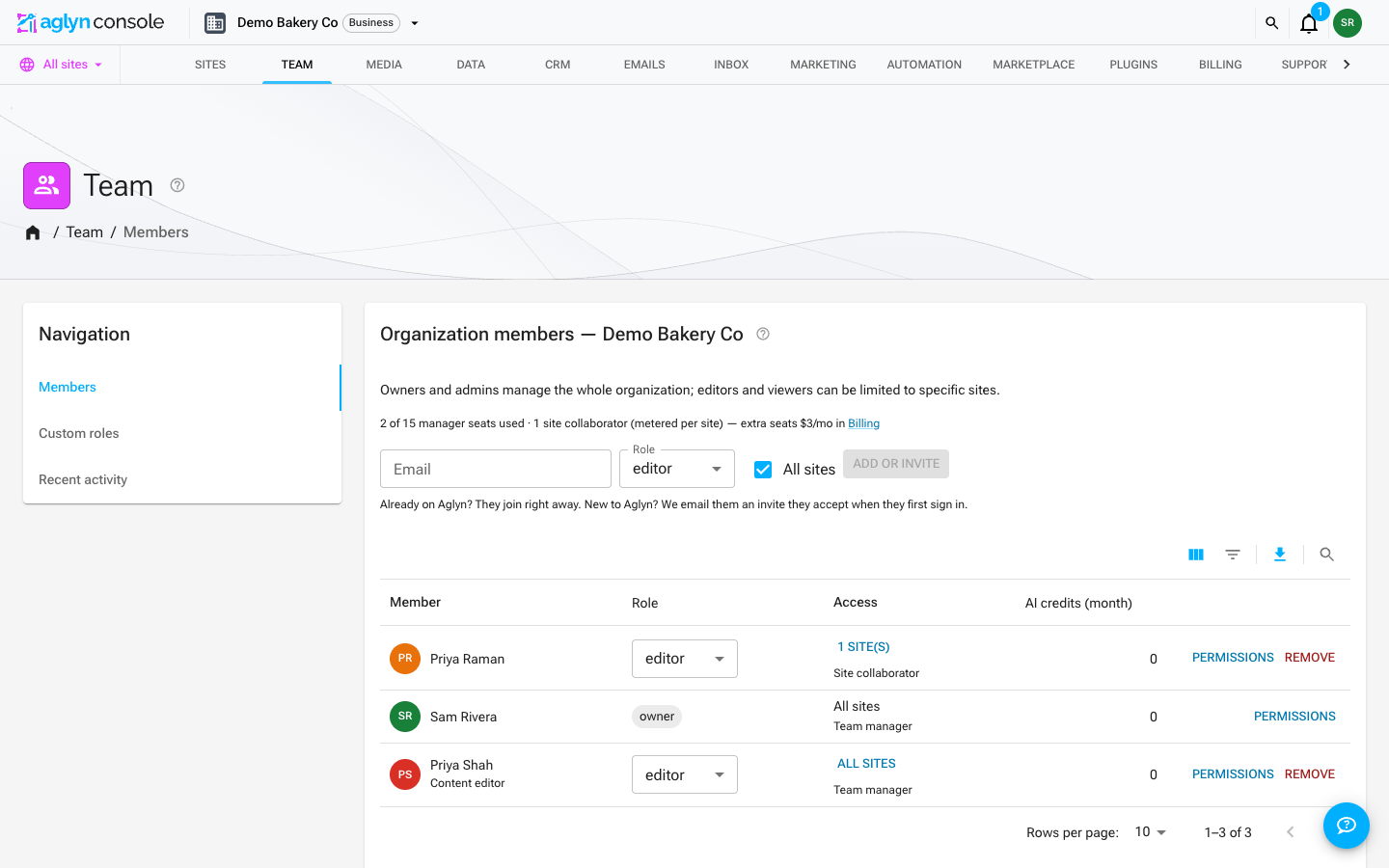
The Team page's roster filters through its table's toolbar: Filters narrows it
by Role (is one role, or is any of several) or Access (is Team
manager or Site collaborator), and Search finds a member by the start of any word of their name,
email address or job title — ada, lovelace or example.com all find Ada Lovelace at
ada@example.com. The filters and the search add up, and they are answered by the query
that reads the roster, so the table lists every member who matches, not a narrowing of
the rows already on screen. Each filter in force shows as a chip above the table; see
Filter and search a list. The
role pickers and Permissions in each row work as before.
Team roles
- Invite teammates to a site and assign roles.
- Create custom roles with unique permission sets.
- Apply per-member overrides on top of a role.
- Permissions are enforced across the console's APIs and surfaces, and team members act in the owner's organization, not their own.
Organizations
Aglyn is built around organization workspaces: an organization subscribes once, owns
multiple websites, and shares media, plugins, dynamic data and billing across them. You
can belong to several organizations with a different role in each (owner, admin, editor,
viewer), and editors/viewers can be limited to specific sites. Each organization gets a
Slack-style workspace address (your-org.aglyn.com).
Every account operates inside an organization — solo accounts simply get a personal workspace automatically. The team features above keep working unchanged.
Three kinds of user
The Team table labels every row with its type, because the type — not the role —
decides which seat it uses. The same editor role is one or the other depending on
whether their reach is the whole organization or a list of sites:
| Type | Reach | Seat |
|---|---|---|
| Team manager | The whole organization | One of your team seats (managersPerOrg) |
| Site collaborator | Only the site(s) they're granted | A collaborator seat on each site they can reach — never a team seat |
| Site member | A published site, as a visitor with an account | None. Free and unlimited on every plan |
Pending invites carry the same label, so you can tell a pending manager from a pending collaborator before it's accepted.
Site roles
Every person with access to a site holds one of four site roles. Managers get
admin on every site in the organization; collaborators are given a role per site.
| Site role | Can edit content | Can publish | Notes |
|---|---|---|---|
| Viewer | No | No | Read-only |
| Author | Yes | No | Drafts and edits everything; nothing they do goes live |
| Editor | Yes | Yes | The usual working role |
| Admin | Yes | Yes | Also manages the site's people, domain and plugins |
Author is the role to give a client who should work on their own content without being able to put it in front of visitors. Concretely, an Author cannot:
- publish or unpublish a page, or change its address
- change which saved version a page, layout or component serves
- schedule any of the above for later
- publish, unpublish or schedule a collection entry
- delete a page, layout or component
- read the site's orders or its webhook signing secrets
- ring a sale at the register, or build a draft order
- issue or void a gift card
- publish a members-only post, or email it to subscribers
- create, change or delete a redirect — a redirect decides what every address on the live site serves, with no publish step in front of it
Everything else is open to them: writing and designing pages, editing layouts and components, uploading media, drafting and editing entries, and saving as many versions as they like. Someone with a publishing role reviews the draft and publishes it.
This is enforced in the database itself, not just hidden in the console — an Author cannot publish through any route into Aglyn.
A site's collaborators
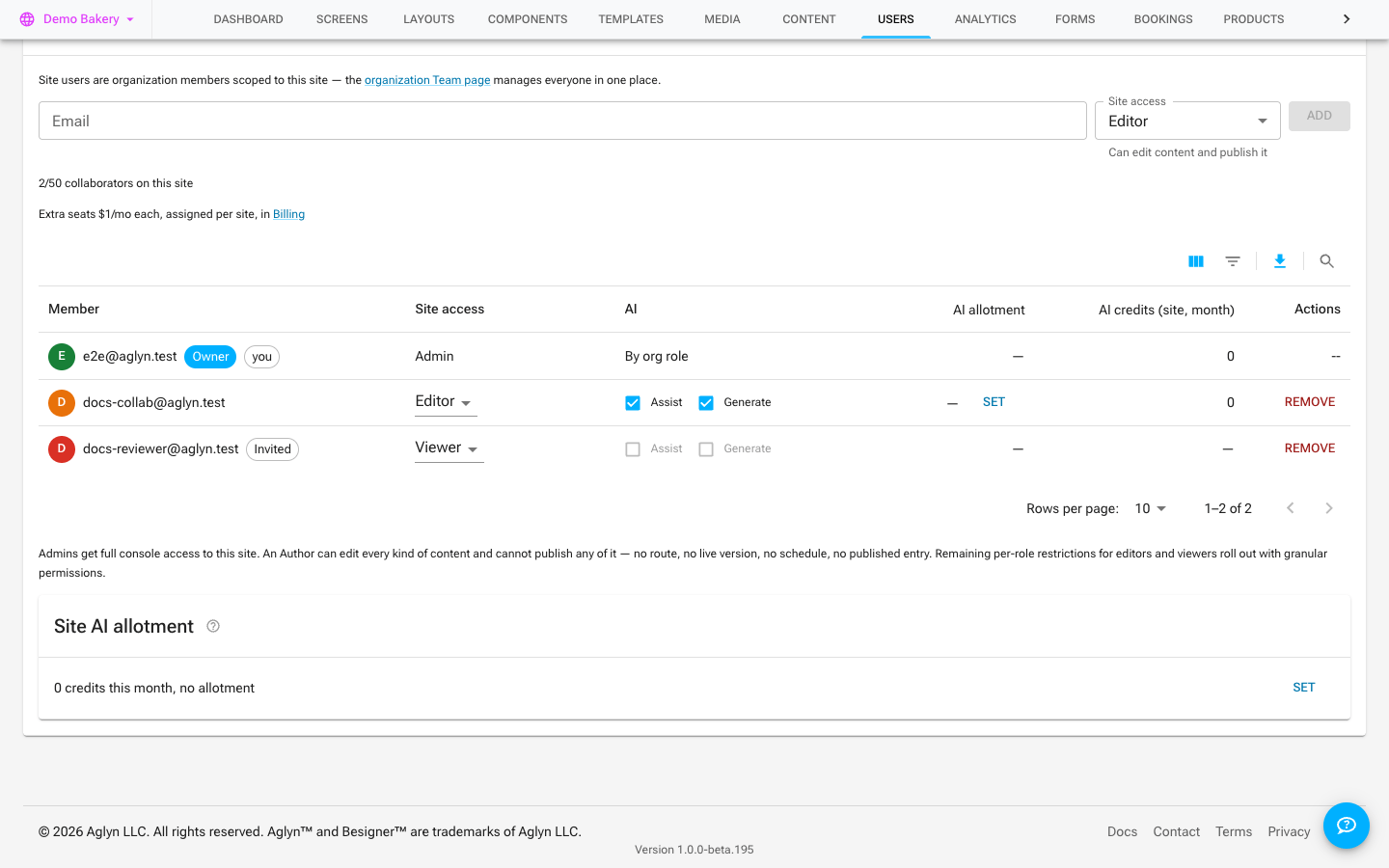
A site's collaborators are listed in the Users card on that site's Users page, ordered by email address with the organization's owner first. Filters in the table's toolbar narrows it by Site access — is one role, or is any of several — and the search box finds collaborators whose email address starts with what you type. Both reach every collaborator on the site, not only the page on screen, and each filter in force shows as a chip above the table. The filter and the search add up. The search matches the start of the address, because the list holds addresses rather than names. See Filter and search a list.
AI access for collaborators
A site collaborator's AI access is decided per site, on the site's Users card, with two boxes beside each collaborator: Assist (the assistant, copy rewrites, generating a section) and Generate (AI generation jobs and AI edits). The site role sets the default — Admin, Editor and Author get both, Viewer gets neither — and the boxes refine it for that person on that site. A collaborator on two sites can have AI on one and off on the other.
The boxes are not a hide-the-button control: every AI request from the site names the site, and the request is refused when the box is unticked, whichever surface it came from. A collaborator whose request names no site at all is refused too. Changing a box is recorded in the site's activity feed, and the boxes become settable once a pending invite has been accepted.
Organization-wide members are not affected by these boxes; their AI access follows their org role, custom role and overrides — see Custom roles & permissions.
A site's Users card also shows what each collaborator drew from the workspace's AI credits on that site this month, so an agency can see which client site's people are generating what. The figure is the site's slice of the member's month; the whole month, split by site, is on the member's page under Team.
The same card has an AI allotment column — the credits each collaborator may draw on that site each month, hard or soft — and a Site AI allotment card beneath it for everyone on the site together. Members with Manage billing set both; a collaborator who is the site's Admin can set the other collaborators' allotments on that site, never their own. See AI allotments, usage and model choice.
What a site collaborator sees
Someone invited to a specific site rather than the whole organization gets a console scoped to that site: they land on it when they sign in, and the organization pages — Team, Media, Data, Plugins, Marketplace, Billing, Settings — aren't part of their console at all. With access to more than one site, they get the sites list to choose from. Organization-wide members see everything as before.
Support is one of those organization pages, so a site collaborator raises problems with whoever invited them rather than with Aglyn directly — see Support & community. Quota warnings still reach them on their own site's pages, since a full site is a limit they will run into; the warning names the workspace admin to ask instead of offering an upgrade they cannot buy.
Site membership
- Visitors can sign in / sign up to your site.
- Member accounts are unlimited on every plan — including Free. Signups are never metered, capped, or charged per account.
- Gate pages as members-only so only signed-in members can view them.
- New members flow into your CRM.
The platform safety limit
There is one ceiling behind all of that, and it is an abuse control rather than a plan dimension — the same number on every plan, free through enterprise, with nothing to buy:
| Records on one site | Ceiling |
|---|---|
| Member accounts | 50,000 |
| Leads | 200,000 |
Past the ceiling, new sign-ups (or lead captures) are refused. The visitor sees a plain "not accepting new accounts right now" message that does not name a limit, and your console shows a New member sign-ups are paused notice with the count of refusals this month.
It does not clear on its own. Unlike the form and bandwidth ceilings, this one counts records you currently hold rather than a month's activity, so nothing lifts it at the month boundary — the notice deliberately never names a date. Deleting records below the limit starts acceptance again immediately, and if the traffic is real, support will raise it.
Seats
Seats cover your team only: organization seats (workspace-wide) and per-site collaborator seats (teammates limited to one site). Both are metered and enforced; buy seat add-ons to grow. Site member accounts — visitors who sign up to your published site — are not seats and are never capped. See Billing & plans.
Two things never take a seat:
- Aglyn staff. A staff member who builds your workspace or joins it to help is marked Aglyn staff · no seat on the Team page and is left out of every seat count. See Aglyn staff on your team.
- A pending owner handoff. Handing the workspace to a new owner moves the owner seat rather than adding one. See Hand off the workspace to a new owner.
Related
- Billing & plans
- Staff console (Aglyn staff only)