Import & export
Datasets move in and out as CSV, JSON or NDJSON, so you can back them up, edit them in bulk in a spreadsheet, or bring records over from another tool. Both run on the server: a large dataset is never loaded into your browser, and nothing is written until you have seen what an import will do.
Starter and above (datasets need the data store). Importing needs the Manage data permission. Exporting needs only access to the dataset: any member who can see it can export it, and Export is shown to them while Import is not.
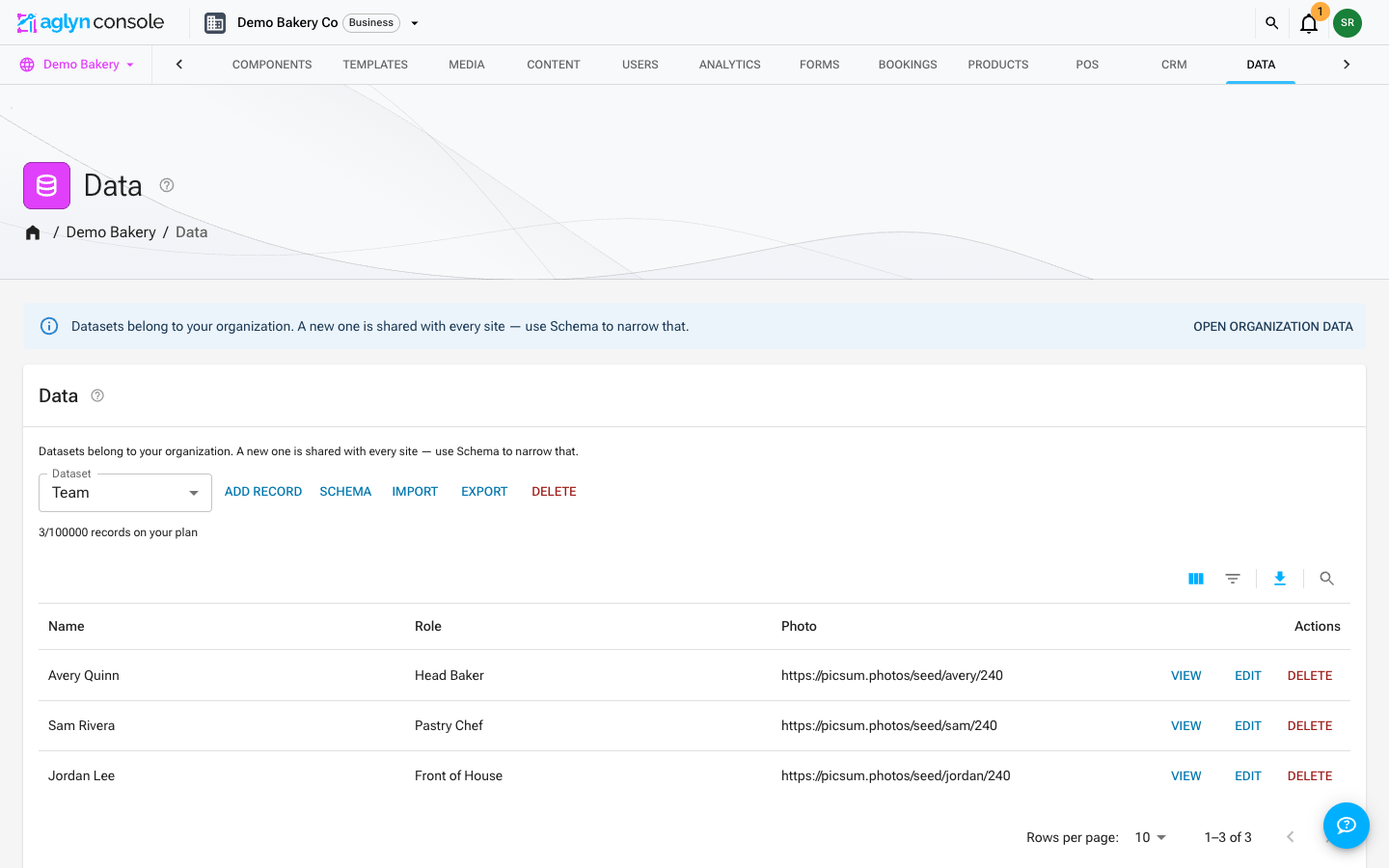
Pick the dataset on the Data page, then use Import or Export beside it.
Export
Export opens a dialog that asks three things: which fields, which records, and which format.
Choose the fields
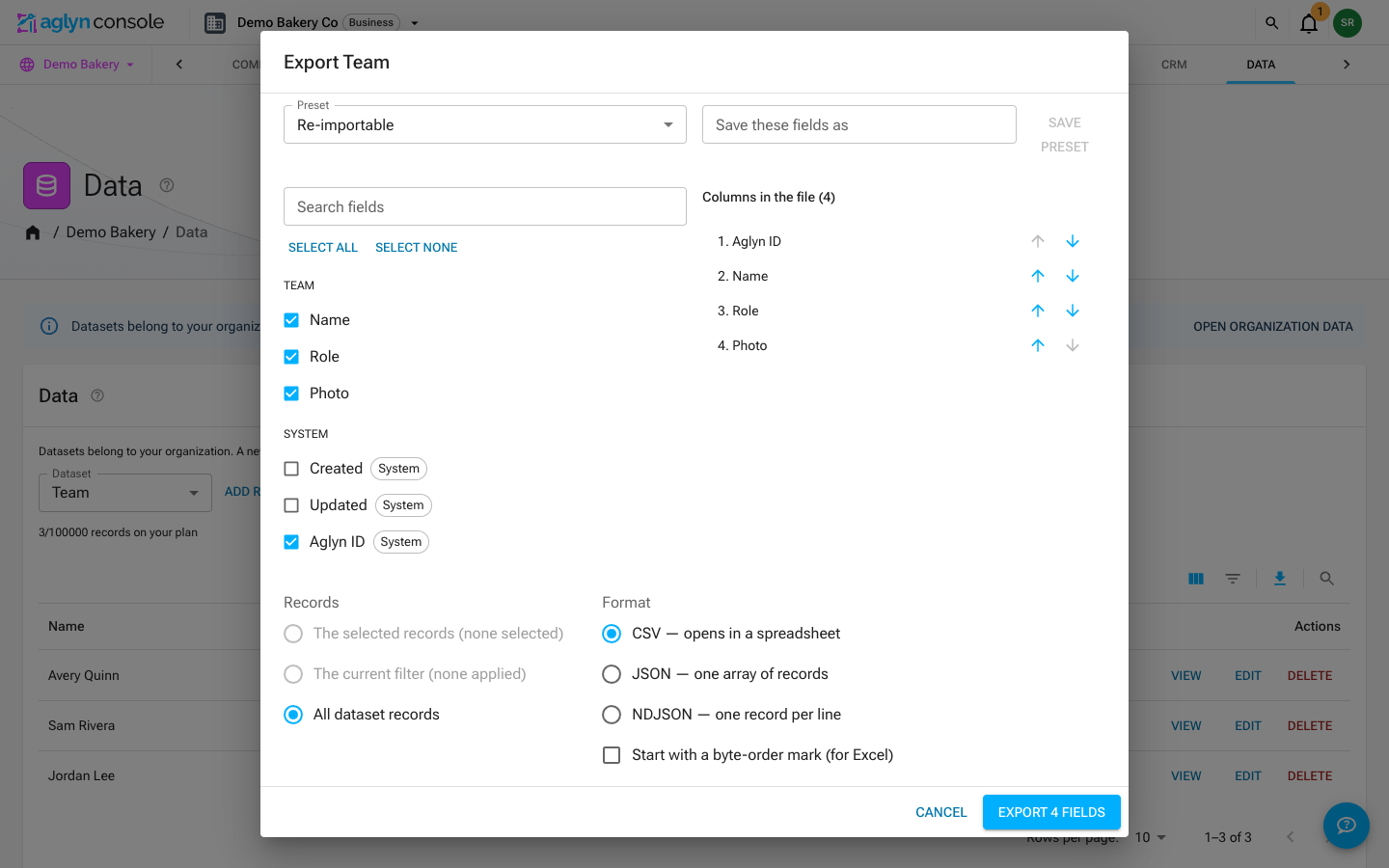
Every field of the dataset is offered, plus three the platform keeps on every record: the record's Aglyn ID, and when it was Created and last Updated. Search the list, tick what you want, and move fields up or down to set the column order. Presets fill the list for you:
- Re-importable (the default) — the Aglyn ID and the dataset's page address first, then every field an import can write. A file exported this way comes back in and finds the records it came from.
- Everything — every field, including the record's times.
- Minimal — the ID, the page address and the required fields.
Save a set you use often as your own preset. Your last choice is remembered for this dataset.
Choose the records
- Every record in the dataset — not only the page of records on screen.
- The current filter — when the records table has filters or a search applied, only the records it is showing.
What you get
- A CSV with one column per field you chose, headed with the field's name, so the file maps straight back in. Turn on the byte-order mark if the file is going into a spreadsheet that misreads accents.
- JSON (an array) or NDJSON (one record per line), keyed by field ID.
- Values in a form an import reads back: dates and times as ISO-8601, coordinates as
latitude, longitude, a list's items separated by;, a reference as the ID of the record it points at, and a map field as JSON.
Large datasets
The server streams the file a page at a time, so the size of the dataset is not a limit. It also says up front how many records it is sending, and the download is checked before it is saved: if fewer arrive — a dropped connection mid-transfer — you are told the export is incomplete and nothing is saved. Run it again. Records added while an export runs may or may not be included; the count is taken when it starts.
Import
Import opens a wizard titled with the dataset's name. You can go back to any step until writing starts, and a closed tab picks up where it left off.
1. Upload
Choose a file or paste its contents. The format, the separator (comma, semicolon or tab) and whether the first line is a header are detected; change any of them if the preview looks wrong. A file is refused before upload when it holds more than 50,000 rows — split it and import each part.
2. Columns
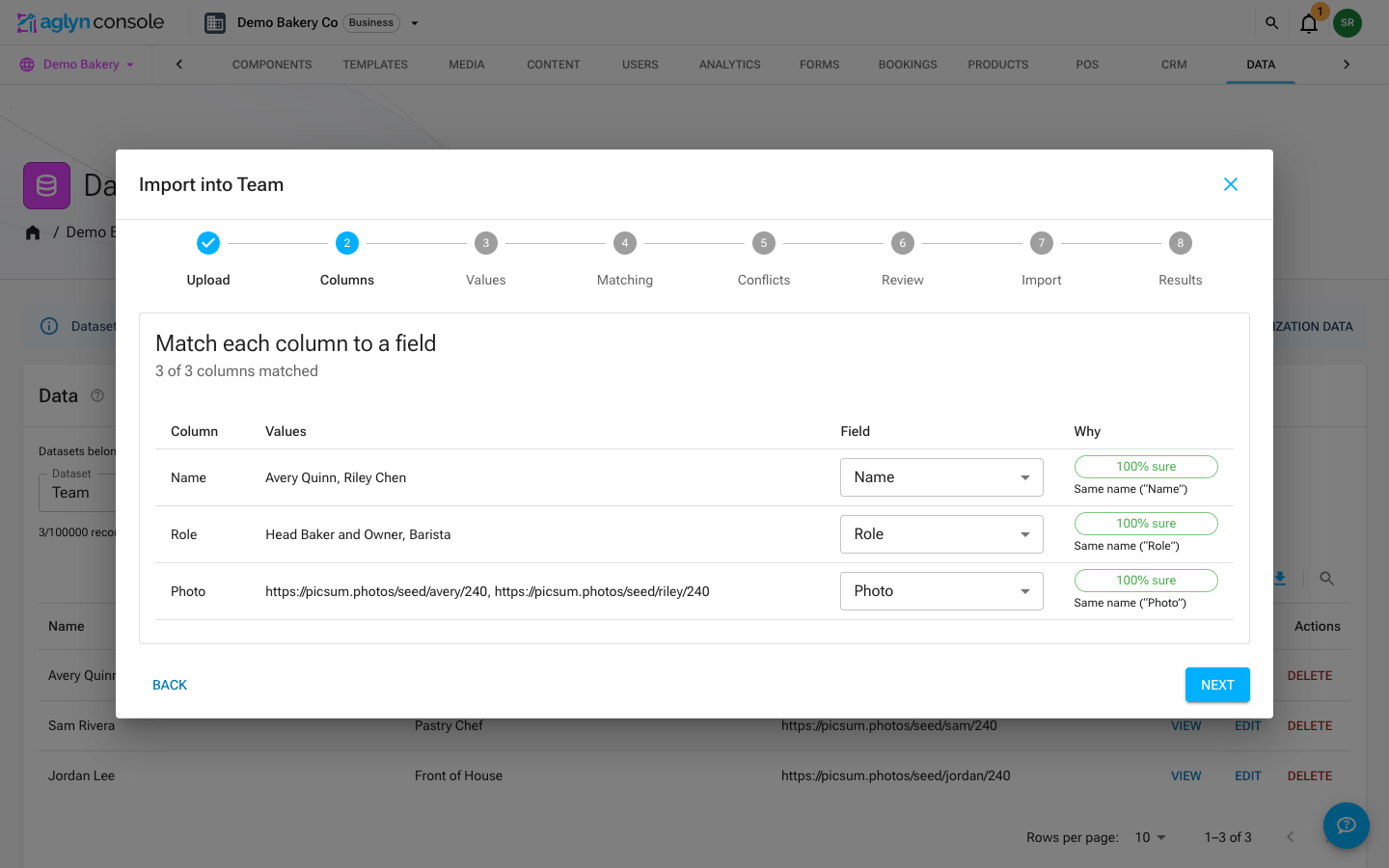
Each column is matched to a field of the dataset, with how sure the match is: by the field's name, by its ID (what older exports used as headers), by a close spelling, or by what the column's values look like. Remap a column, or ignore it. Two columns cannot fill the same field, and a required field needs a column before you can go on.
A dataset field whose ID is id is listed under its own name, apart from the record's
Aglyn ID.
3. Values
What reading each column did, with counts and examples — a date read day-first, a number with a decimal comma, a list split into items — and the choices that need you:
-
Dates that read either way (
03/04/2026): pick day-first or month-first. -
Values a field with fixed options does not hold: map each to one of the options, add it to the field's options, leave it blank, or refuse the rows that carry it.
-
References are read by the referenced record's ID or by its name (the field the reference displays). A value that names no record, or more than one, is listed with the records it may mean — the ones it named, then records named like it — and you choose: use one of them, create it in the referenced dataset, leave it blank, or refuse the rows that carry it. In a field that holds several references each item is decided on its own, and an item left blank is dropped from the list. Either way an import never leaves a reference pointing at nothing.
Create it is offered when a record of the referenced dataset needs nothing but its name. The record is created once, however many rows name it, holding the name in the field the reference displays, and counts toward that dataset's records on your plan; a row whose record could not be created fails, saying why. A reference to a dataset that is not shared with you is exported by ID but not imported.
A list or multi-reference field accepts items separated by commas, semicolons, pipes or
line breaks, or a JSON array (["Residential", "Commercial"]).
4. Matching
Choose how a row finds the record it updates, in priority order:
- the record's Aglyn ID and the dataset's page address are chosen to start with;
- add any text or number field — an email, a SKU, a name — as another key.
Text keys ignore case and surrounding spaces. You see how many rows matched one record, matched none (new), matched several, or repeat an earlier row in the file — a repeated row is held back, so two rows never write one record.
5. Conflicts
Decide what happens:
- A row that matches a record: update it, skip it, or add it as a new record anyway.
- A row that matches nothing: create it, or skip it.
- A row that matches several records: skip it, or choose the record row by row.
For each field, choose how the file's value meets the record's: fill blanks (the default — nothing already there is replaced), overwrite, keep what the record has, or append to a list. And choose whether a blank cell leaves the field as it is (the default) or clears it. Every row whose file value differs from what the record holds is listed, before → after, and any row or field can be set differently.
6. Review: the dry run
The server plans every row without writing anything: how many records will be created, updated, left unchanged, skipped or will fail, with a before → after table you can filter. A row fails here, rather than halfway through, when:
- a value breaks the dataset's rules — outside a field's options, past its length or bounds, not matching its pattern — and the row names the field;
- a required field is blank on a new record;
- a reference names no record and you chose to refuse its rows;
- the dataset is full: new records past your plan's records per dataset (or any new record while your data storage is full) fail as past what your plan allows. Updates never count against the limit.
Every class of warning — a value about to be overwritten or cleared, a guessed date, a value added to a field's options, a row past the plan — needs its own I understand before Import is enabled.
7. Import
Records are written in chunks of 200 with live progress. Pause stops after the chunk in flight; resume carries on from where it stopped, and a chunk that is retried never writes a row twice. Each record is written the way the console writes one: page addresses fill in from their source field, and the pages on your sites that repeat over the dataset are refreshed.
8. Results and undo
The results list what happened to every row, and download as a CSV with the file's own columns plus the outcome, the reason and the record's ID.
Undo is open for seven days. It deletes the records the import created and puts back the values it changed. A record someone edited since the import is shown with what it holds now and what undo would restore, and you choose for each one. Undo keeps relations whole: a created record another record points at is left in place when the reference restricts deletes, and the reference is removed from the other record when it is set to clear. A record created in a referenced dataset because a reference named it is kept: other records may point at it by then.
Tips
- Export with the Re-importable preset first to get the exact column shape, edit that file, then import it: every row finds its record by its Aglyn ID.
- Matching on a text or number field asks the same index the records table's filters ask, so a record those filters cannot find is not matched by it either. Re-saving the record fixes it.