CRM
The CRM is where your team works the people who interact with your sites. Aglyn builds the contact list on its own from everything a visitor does — a form submitted, an account created, an order placed, a booking made — and the CRM puts the rest of a sales team's records around that list: leads to qualify, the companies people work for, a deals pipeline, tasks, a timeline of calls and meetings, reports, and the custom fields your business describes people by.
In the console the plugin is called CRM. It is one tab, and a hub of eight
sections, each with its own address under your site at
…/hosts/{site}/crm/<section>; a bare …/crm lands on the first. The same hub
opens at the organization level, over every site at once, at
…/{organization}/crm/<section> — see
At the organization level. The surface was called
Contacts while it was a single list, and a link kept from then — the older
…/contacts address, under a site or under the organization — still opens the
hub.
The CRM tab in the console isn't available yet — it's a release-flagged feature, so there's no CRM tab in your workspace and nothing to switch on under Organization → Plugins.
Capture is already running, though. Contacts are ingested from forms, member sign-ups, orders and bookings today, and you can read them over the REST API in the meantime — nothing is lost while you wait. Records-band overage is not billed while the page is unavailable.
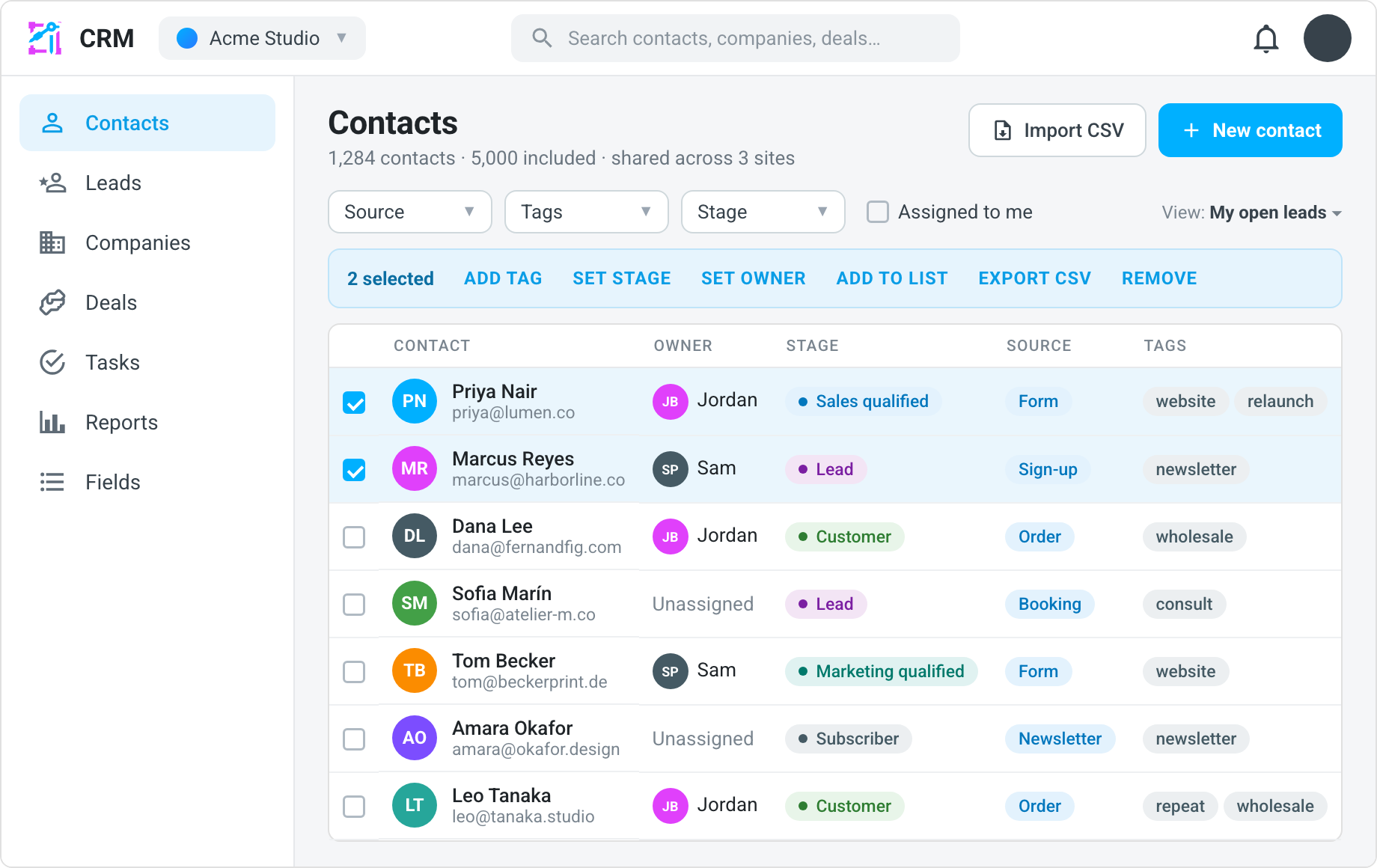
What's in the CRM area
| Section | Address | What lives there |
|---|---|---|
| Contacts | /crm/contacts | Every person your site may see, as a list with Owner and Stage columns, filters and search; a person's own page is /crm/contacts/{id}. CSV import, bulk actions, saved views and the timeline live here too. |
| Leads | /crm/leads | People a site has captured but not yet qualified — a status, an owner and notes on each, and a conversion into a contact, a company and a deal. |
| Companies | /crm/companies | The organizations your contacts belong to, keyed by domain — a captured contact is linked to the company at their email domain on its own; a company's page is /crm/companies/{id}. CSV import and export and bulk actions too. |
| Deals | /crm/deals | The sales pipeline — open deals by stage, with an amount, an owner and an expected close, as a board or a table with export and bulk actions; a deal's page is /crm/deals/{id}. |
| Tasks | /crm/tasks | Calls, emails, meetings and to-dos by due date, each linked to the contact, company or deal it is for, with export and bulk actions. |
| Reports | /crm/reports | New contacts over time, sources and the lifecycle funnel, conversion by source, the lead funnel, the open pipeline and its forecast, won and lost, activity by teammate, and the task load — every table exportable as CSV. |
| Fields | /crm/fields | The custom fields on a contact — text, number, date, choice, checkbox or link — which a form field can save into. |
| Settings | /crm/settings | What the CRM does on its own for every site in the workspace — whether a company is created from a captured contact's work email domain. |
Three things cut across the sections rather than having one of their own. Saved views keep a list's filters, columns and sort under a name on every section that has a list, shareable and linkable; see Saved views. Activities — the calls, emails, meetings and notes your team logs — are filed from the page of the record they are about and read in that record's timeline; see Activities & the timeline. Automations can start on what happens in the CRM and act on it; see Automations for the CRM.
Every record here is also on the REST API: contacts under
/v1/contacts, and companies, pipelines, deals, tasks and activities under one
pair of scopes, crm:read and crm:write.
Unified ingestion
Contacts are ingested from across your site:
- Form submissions
- Site members (sign-ups)
- Orders from commerce
- Bookings from scheduling
Duplicate signals from the same person are unified into one contact. A person your site has met but not yet qualified is also a lead; converting the lead joins the same contact rather than making a second one.
Every tier includes a CRM records band — one number for contacts, companies and deals together. Only the Free tier's band is a hard limit; paid tiers never drop a record, and growth past the band meters as overage. That overage is not billed while the CRM is unavailable. See CRM records under Billing & plans.
What each plan includes
| Free | Starter and above | |
|---|---|---|
| Contacts — the list, tags, notes, segments, CSV import and export, bulk actions | Yes, banded at 100 records | Yes, banded by tier and metered past the band |
The CRM suite — Leads, Companies, Deals, Tasks, Reports and Fields; the two CRM dashboard cards; the CRM automation steps; the crm:* REST resources | Shown in the rail with a lock; opening a section names the plan that includes it | Yes |
| One-to-one email from a record | None | A daily cap by tier — see One-to-one email |
The contacts list is on every plan because it is the audience your email campaigns read; the suite is what a sales team builds on that list. A record's activity log is bounded on every plan at 5,000 logged activities per record — a call a day for fourteen years — after which the log dialog, the automation step and the API refuse another entry on that record with a message saying so.
The contacts page
The Contacts section is the list the rest of the CRM is built on. It lets you:
- Browse the list, with Owner and Stage columns, a stage filter, an Assigned to me toggle, and one optional column per custom field.
- Add a contact by hand with New contact — see The contact record.
- Open a contact's own page to edit their profile, see where they came from, and read their history.
- Add tags and notes.
- Log calls, emails, meetings and notes against a person, and read them in one timeline with everything the platform captured — see Activities & the timeline.
- Tick rows and act on all of them at once — tag them, set their owner or stage, add them to an email audience, export them, or remove them from this site; see Bulk actions.
- Export to CSV, and Import CSV — see below.
Under the list, a Recent activity feed shows the newest calls, emails, meetings and notes anyone on the team has logged against any record.
Import from CSV
Import CSV on the Contacts section brings a spreadsheet of people in — map its columns to contact fields, preview the first rows, and import in batches with a report of what was added, updated and skipped. See Import contacts from CSV.
Segments
Group contacts into segments — saved filters over tags and sources, kept from the Contacts list's filter bar through Save as segment… in the views menu — and target them directly in email campaigns. A saved view keeps more than a segment — every filter, the columns and the sort — and a contacts view can be an audience in its own right, picked beside a segment when an audience is built from a rule. An audience built from a rule can also read a contact's owner, lifecycle stage, company and custom fields; see email audiences.
Everywhere the CRM shows up
The CRM is wired into the rest of the console rather than standing beside it. Every place a person's record is met links into the CRM, and the CRM links back out to the record that put the person there.
| Where | Into the CRM | Out of the CRM |
|---|---|---|
| Search (the top bar) | Contacts by name, email, phone or company; leads by name or email; companies by name or domain; deals by title. Each result opens the record. The CRM groups appear only for members who may open the CRM. | — |
| Inbox | A submission row's ⋮ → Open contact in CRM; a member or lead row's Open in CRM. | A contact's timeline opens the submission that captured them, in the Inbox reader. |
| Forms | A form's page: See the contacts this form captured in the CRM, and the CRM routing card. | — |
| Products → Orders | An order's dialog: View customer in CRM. | The contact header's order count opens the orders list narrowed to the person's address; a timeline entry opens the order itself. |
| Bookings | Each upcoming booking: View in CRM. | A timeline entry for a booking opens the Bookings page. |
| Users | A site user's row menu: Open in CRM. | A timeline entry for a sign-up opens the Users page. |
| Dashboard | The Inbox card counts the site's open leads and links to Leads; the CRM at a glance card's figures open Contacts, Deals and Tasks. The organization's Sites page carries CRM at a glance and Tasks due above the site grid, totaling every site and opening the organization-level hub. | — |
| Marketing | — | The Relationship card's campaign attribution opens the campaign's page. |
| Setup → Activity | — | Adding, deleting or converting a contact, company, deal or lead is logged, and each entry opens the record. |
A link that arrives by a person's address — from an order, a booking or a site user — opens the Contacts list asked for that address, and the list moves straight on to the record when exactly one person matches. No match leaves the filtered list on screen, which is the honest answer for a capture the audience band dropped.
At the organization level
The CRM tab under Organization opens the same hub over every site in
the organization at once: the same eight sections, the same record pages,
the same bulk actions, import, saved views, reports and settings, at
…/{organization}/crm/<section>. A record captured on any of your sites is
listed there, and opening it edits the same record the site's own hub edits.
What differs from a site's hub:
- Every create names a site. A contact, company, deal or logged activity
is always captured by a site — that is what decides which of your sites may
see it and whose marketing consent a contact's checkbox records — so New
contact, New company, New deal, Log activity and Import CSV
each begin with a required Site picker. The pick is remembered for the
session, and an organization with exactly one site never sees the field. The
REST API asks the same question as
consentSiteId. A task is the one exception: New task offers This organization (no site) beside the sites, for work the organization itself owes — see Organization tasks. - The cross-site facts. The contacts list gains a Known by column — the sites that have captured each person — and a contact's page gains a Known by card listing those sites, each with the person's marketing consent for that site (opted in, opted out, or no record — never a bare "consented") and a link to open the person in that site's hub.
- Reports total the organization, not one site — the Lead funnel included, which reads every site's leads, at most 200 per site, and says so when a site held more.
- Leads are listed from every site with a Site column, since a lead belongs to the site that met the person; the per-site note about which forms file a lead stays on each site's own hub.
- Every action runs here too. A deal moves on the organization's board, two records merge, a person is erased, and an email is sent from a record, whether or not any site captured it. An email still leaves from one site — the site that captured the person, or the one you pick under Send from — because the sending address, the suppression list and a person's stated refusal are each a site's.
- The organization's activity feed (Team → Activity) records what is done here: each stage move, merge, erasure and email, and one line per bulk action — "Owner set on 3 deals". A site's own feed records what is done on that site's hub, as before.
- Settings are the organization's, as they always were; the Default owner card lists one picker per site.
- The dashboard cards total the organization too. The organization's Sites page (Organization → Sites) carries CRM at a glance and Tasks due above the site grid — every figure a total over every site, the tasks your own across every site — and each link opens the matching section of this hub. The row appears for the same readers this hub admits and is absent, not empty, for anyone else; it is not customizable, unlike a site's own dashboard.
Who may open it: an organization owner, admin or editor — a member of the whole organization holding the manage data permission. A collaborator added to particular sites is refused here, with a note pointing at the sites they hold, because this is the one surface that reads across every site; they open the CRM from a site they have access to instead.
Who can open the CRM
Opening the CRM takes the workspace's manage data permission — owners, admins and editors by default, or a custom role granting it. What a reader then sees follows the site they have open: a record captured on one site is visible to that site, to every site declared to be one sender with it, or to the whole organization when the organization has chosen to share its data. A collaborator scoped to one site sees that site's people, deals and tasks and no others. The rule is the same in every section, so no section can show a record the reader could not open as a contact.