Connect a domain
Move your site from its Aglyn subdomain to a domain you own. It's one card, one DNS record, and one button — there's no multi-step wizard.
Starter and above. On Free, the card explains: "Custom domains are included from the Starter plan — see Billing to upgrade."
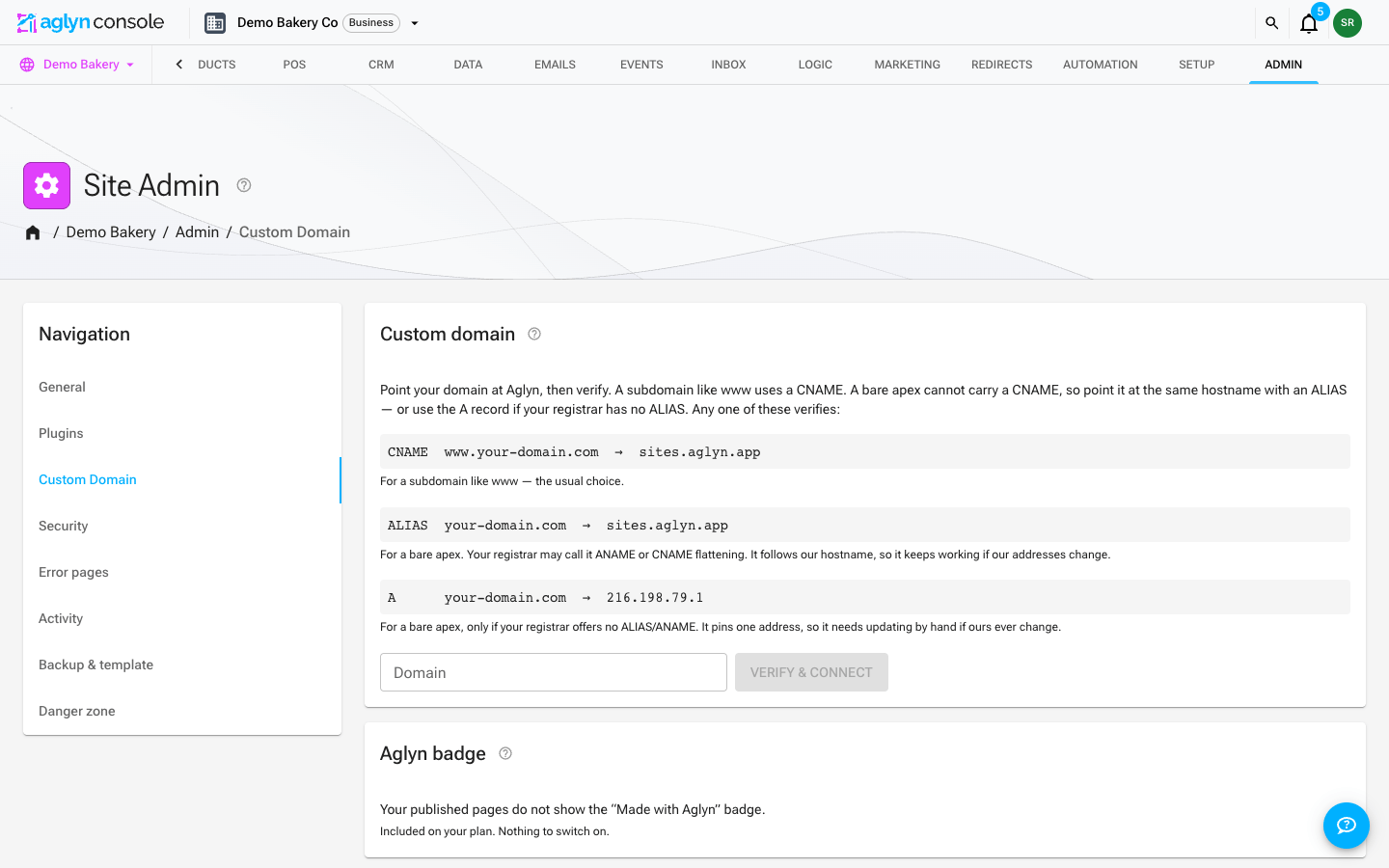
Steps
- In the site's Admin page, choose Custom Domain in its navigation. The card explains: "Point your domain at Aglyn, then verify. A subdomain like www uses a CNAME. A bare apex cannot carry a CNAME, so point it at the same hostname with an ALIAS — or use the A record if your registrar has no ALIAS. Any one of these verifies", and lists the records with your domain filled in, each with a line saying when it's the right one. Type a bare apex and the ALIAS line comes first; type a subdomain and the CNAME line does.
- At your registrar's DNS settings, add one of those records — see the quick reference below.
- Back in Aglyn, type your domain into the Domain field and press Verify & connect. Aglyn checks DNS from public resolvers and, if the record checks out, connects the domain in the same click.
- On success the card confirms "your-domain.com" connected and shows the domain as a green chip. An apex — connected by ALIAS or by A record, since both are checked the same way — gets an extra note: "Apex verified by the addresses it resolves to."
If DNS hasn't propagated yet, Verify & connect tells you what it found instead — either the record it saw and what it expected, or that no record exists yet — and asks you to try again in a while. Nothing is saved on a failed verify, so re-running it is always safe.
After it connects
The chip next to your domain says what it is actually doing. SSL provisions automatically — there is nothing to upload or renew — but it takes a few minutes, and the chip is how you tell "still working on it" from "stuck".
| Chip | What it means | What to do |
|---|---|---|
your-domain.com — live | Attached, DNS resolves here, certificate issued. | Nothing. |
your-domain.com — issuing certificate | Everything checks out; the certificate is still being issued. | Wait a few minutes and press Check status. Until it finishes the domain may show a security warning. |
your-domain.com — ownership check needed | Your domain is registered to another account on our hosting platform, so it has to be proven yours first. | Add the TXT record the card prints, then press Re-attach. |
your-domain.com — DNS not pointing here | Attached, but the domain no longer resolves to us. | Check the record at your registrar — see troubleshooting. |
your-domain.com — not attached | Saved here, but not attached to the serving platform, so it serves nothing. | Press Retry attachment. If it keeps failing the domain is likely held by another account — contact support with the domain name. |
your-domain.com — attachment pending | Our attach call never landed, and the platform could not be asked just now. | Press Retry attachment. |
Three buttons sit next to the chip:
- Check status re-reads the live state. A certificate arrives on its own a few minutes later, and this is how you see that it has.
- Retry attachment (labeled Re-attach once the domain is healthy) re-runs the platform attachment. Always safe to press.
- Disconnect releases the domain — see below.
If other DNS records are answering for the same name, the card says so and names them, even when the domain is live. That is worth acting on: a leftover record from a previous host answers alongside the correct one, and the site then loads for some visitors and not others.
The redirect from your-site.aglyn.app is only set up once the domain actually serves.
A domain that is attached but waiting on an ownership check or a DNS fix leaves the Aglyn
subdomain working, so your site always has one address that answers.
Your Aglyn subdomain afterwards
Once the domain is connected and serving, your-site.aglyn.app redirects to it —
same page, same path, so an old link to your-site.aglyn.app/pricing lands on
https://your-domain.com/pricing.
That is deliberate. Serving the same pages at two addresses splits your search ranking between them, and lets a search engine pick which one to show. One address keeps the credit on the domain you own.
Disconnect the domain and the Aglyn subdomain starts serving again on its own, within a minute or so. The redirect is temporary by design so that reversal always works.
Registrar quick reference
The exact screen differs by registrar, but you only ever add one record:
A subdomain (www.example.com, shop.example.com, …):
| Field | Value |
|---|---|
| Type | CNAME |
| Name / Host | www (or the subdomain you're connecting) |
| Value / Target | sites.aglyn.app |
| TTL | default is fine |
A bare apex (example.com) — first choice:
| Field | Value |
|---|---|
| Type | ALIAS (also called ANAME, or "CNAME flattening") |
| Name / Host | @ |
| Value / Target | sites.aglyn.app |
| TTL | default is fine |
A bare apex, if your registrar has no ALIAS — fallback:
| Field | Value |
|---|---|
| Type | A |
| Name / Host | @ |
| Value | 216.198.79.1 |
| TTL | default is fine |
An apex can't carry a CNAME (that's a DNS rule, not an Aglyn one), which is why it needs
one of these two instead. Prefer the ALIAS: it names sites.aglyn.app rather than an
address, so your registrar resolves it to wherever Aglyn is serving from at the time, and
nothing in your zone has to change if those addresses ever do.
The A record is there because plenty of registrars offer no ALIAS/ANAME and no flattening — for those, it is the only way to point an apex, and it verifies exactly the same. Its one cost is that the address is pinned in your zone by hand: keep it in mind if you ever see the domain stop resolving long after it was working.
CNAME flattening at the apex works, but leave the record DNS only (gray cloud) until verification succeeds — a proxied record resolves to the proxy's addresses, not Aglyn's.
www and the apex?Aglyn serves one connected domain per site. Connect the one you want as your canonical address, then have your registrar redirect the other to it — most registrars offer domain forwarding for exactly this.
One domain per site
Each site carries a single custom domain, and a domain can only be connected to one site across all of Aglyn — connecting it elsewhere answers "That domain is already connected to another site". Disconnect it from the old site first.
Some names cannot be connected at all, and the wizard answers "That domain is reserved
by the platform and cannot be connected to a site". These are Aglyn's own hostnames —
anything ending in aglyn.com, aglyn.app or aglyn.io, including another site's
your-site.aglyn.app address — and names on shared app-hosting suffixes such as
vercel.app, pages.dev or github.io, which nobody can prove they own. Retrying
will not help; connect a domain registered to you instead.
Disconnect
Disconnect, next to the connected domain's chip, releases the domain immediately — there is no confirmation step — and the Aglyn subdomain resumes serving within a minute or so. Disconnecting requires the site admin role.
Aglyn never touches your DNS: the CNAME, ALIAS, or A record at your registrar is yours, so remember to remove or repoint it yourself after disconnecting.