Templates, Blocks & Content
Build faster by starting from something. Aglyn gives you site templates, a section & block library, and a blog with content collections.
Free to use the starter gallery and block library. Some templates and content features scale with your tier.
Site templates & starter gallery
- Spin up a new site from the starter template gallery, which instantiates published pages for you. Starters are copied into your site's own template library, so you can edit and version them like any other template. A starter's first page becomes the site's home page: it replaces the placeholder Home page a new site is created with (which is kept as a draft), but never a home page you published yourself — and that includes the placeholder once you have edited and published it.
- Save a site as a template from Setup → Site template, which publishes it to the marketplace — see save & share a template. Browsing and installing marketplace templates happens in the Start from a template picker, opened by the Templates button on the Pages, Layouts and Components lists.
Section & block library
Drop in pre-built sections and blocks from the library instead of assembling every page from primitives — a fast way to build common layouts.
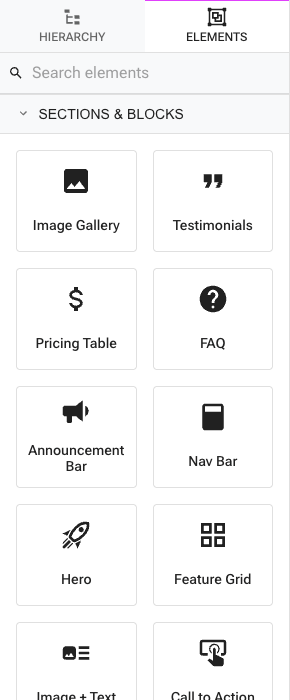
The library is a first-class group in the Besigner: open INSERT → New Element (or the components drawer) and the Sections & Blocks category sits at the top of the list, ahead of the primitive element groups. Every entry inserts a ready-made subtree with sensible props — drop it in, then edit text and styles in place.
The library ships these sections:
| Block | What it inserts |
|---|---|
| Nav Bar | App bar + toolbar with brand text and three page links, in page flow (switch its Position attribute to Sticky for a pinned header) |
| Hero | Centered headline, tagline, and call-to-action button |
| Feature Grid | Three selling-point columns that wrap on small screens |
| Image + Text | Image beside a heading, paragraph, and link button |
| Testimonials | Three customer quote cards |
| Pricing Table | Three plan columns with features and plan buttons |
| FAQ | Question-and-answer list with a heading |
| Call to Action | Accent-colored band with a heading and button |
| Contact Section | Heading plus a working name/email/message form |
| Announcement Bar | Accent strip with a message and link |
| Image Gallery | Three-across image row |
| Footer | Semantic <footer> with brand, page links, social icons, and copyright |
Blocks are ordinary elements once inserted — nothing is locked. Page links resolve against your site's pages (pick targets in the link's attributes), the contact form submits like any form, and social icons appear once you add profile URLs.
Content collections & blog
- Create collections managed in the console.
- Publish a blog with rich entries (images, preview, scheduling) and an RSS feed.
- Use entry-template pages with
{{entry.*}}bindings to render each collection item.