Design custom error pages
When something goes wrong, visitors should still see your site. Design custom error pages for each status.
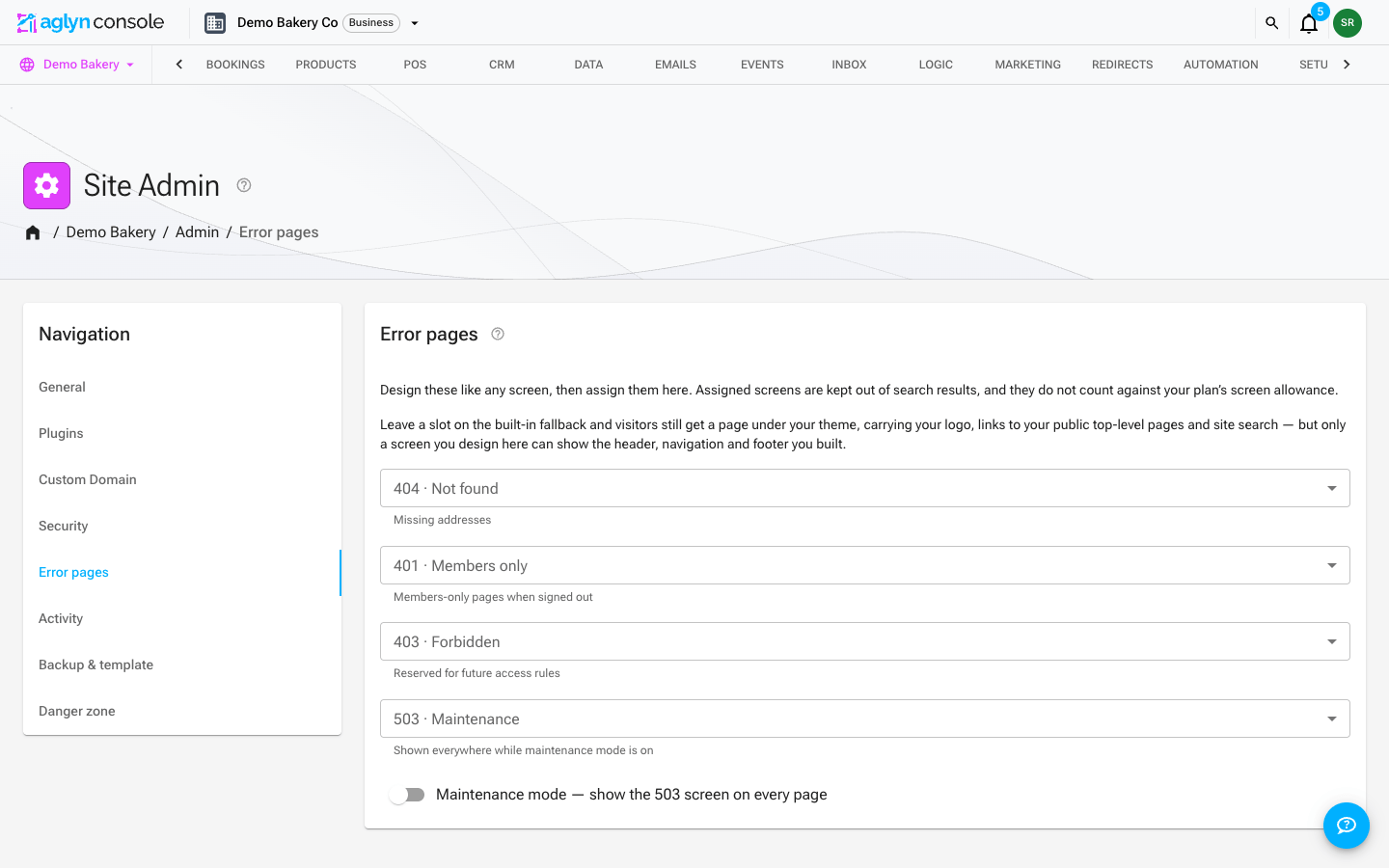
The error pages
| Status | Picker label | When it shows |
|---|---|---|
| 404 | 404 · Not found | The URL doesn't match any page. |
| 401 | 401 · Members only | A members-only page, requested by a signed-out visitor. |
| 403 | 403 · Forbidden | Reserved for future access rules — nothing serves it yet. |
| 503 | 503 · Maintenance | Shown on every page while maintenance mode is on. |
Design one
- Create a page for the status, in Pages, and design it in the Besigner like any other page — add your header/layout, a helpful message, and a link home.
- Assign it. Go to Admin → Error pages. Each status has its own picker — 404 · Not found, 401 · Members only, 403 · Forbidden, 503 · Maintenance — listing every page on the site. Choose your page in the matching picker. The Admin area is limited to site admins, so that is who assigns these.
Step 2 is the one that's easy to miss: designing a page does not make it an error page on its own. Until it's picked in the Error pages card, the status renders the Built-in fallback page, which is what every picker is set to until you change it.
What the built-in fallback gives you
The fallback is not a blank error page. It renders under your site's theme and carries your logo, links to your site's public top-level pages, a search box (on the 404) and a footer — so a visitor who lands on a missing address can always get somewhere.
What it cannot do is show the header, navigation and footer you designed: those live in the page you built them on, and on a 404 that page is precisely the one that wasn't found. Its page links come from your published pages, and only the public ones — an unlisted, password-protected or members-only page never appears there.
Assigning a designed page is still the better answer for any site that cares how this moment looks. The fallback is the floor beneath it.
Assigned error pages are automatically kept out of search results, so a 404 page can't
itself turn up in a search. A missing address also answers with a real 404 status and a
server-rendered page title — your 404 page's SEO title when you've set one, otherwise
Page not found followed by your site's title — so the browser tab and search engines
know what the page is before any script runs.
Error pages are free
An assigned error page doesn't count against your plan's page allowance. It renders on addresses that matched nothing, so it has no URL of its own — the same reason a collection's entry template doesn't count. See what counts against your page allowance.
There's one thing to know, and it's the reason you don't need to publish the page at all:
An error page that is also published at its own address — a 404 page you published
at /404 so you could preview it, say — has an address, so it counts like any other
page until you remove that address.
If you've already published one, the Error pages card says so and offers Remove address. Removing it frees the allowance slot and the page carries on rendering for its status code, which is the only place it was ever meant to appear.
Tips
- Put a search box or navigation on your 404 so visitors can recover.
- Keep the 503 lightweight — it shows when the site is under maintenance.